

The fastest way to automate bookings, cut no-shows, and get paid on time is a dedicated scheduling platform built for trainers, not a patchwork of texts, spreadsheets, and calendar invites. Look for one system that handles self-booking, automated reminders, and payment collection together. The first move: build a public booking page or set a weekly availability template today, and let clients book themselves against it.
TL;DR:
- Automating bookings with a dedicated scheduling platform reduces manual admin hours and increases revenue through prepaid packages and deposits.
- Key features include recurring bookings, automated reminders, flexible payment options, availability buffers, and support for multiple session types.
- Connecting two-way calendar sync, video integrations, and analytics helps prevent double bookings and track performance trends effectively.
- Setting clear cancellation policies with automated enforcement and strategically using reminders significantly lowers no-shows and late cancellations.
- Moving to an integrated platform like FITsociety streamlines operations, improves client reliability, and frees trainers’ time for coaching instead of admin tasks.
What Features Does Personal Trainer Scheduling Software Actually Need?
Personal trainer scheduling only works when the software matches how training businesses actually run: recurring clients, mixed session formats, and payment collected before or after the session, never left to memory.
A public booking page is the foundation. Clients pick a slot on their phone, at 10 p.m. or during a lunch break, without a call or a text chain. Nextro’s approach to trainer booking shows why removing the account creation step matters: fewer clicks between “I want to book” and a confirmed slot means fewer abandoned bookings.
Beyond the booking page itself, a real personal trainer appointment system needs:
- Recurring and package bookings — lock in a client for eight sessions or a standing Tuesday/Thursday slot instead of rebooking one session at a time.
- Automated confirmations and reminders across SMS, email, and push notifications, sent without you touching a keyboard.
- Flexible payment options — deposits, full prepayment, or invoicing, run through a processor that meets PCI DSS standards for handling card data.
- Availability templates with buffers so back-to-back sessions don’t bleed into each other, plus two-way calendar sync to Google, iCal, or Outlook.
- Support for multiple session types — one-to-one, small group, and video coaching, all bookable from the same interface.
Miss any one of these and you’re back to manually reconciling a calendar app against a payment app against a group chat, which is exactly the friction a scheduling app for personal trainers exists to remove.
How Does Better Scheduling Actually Change Your Bottom Line?
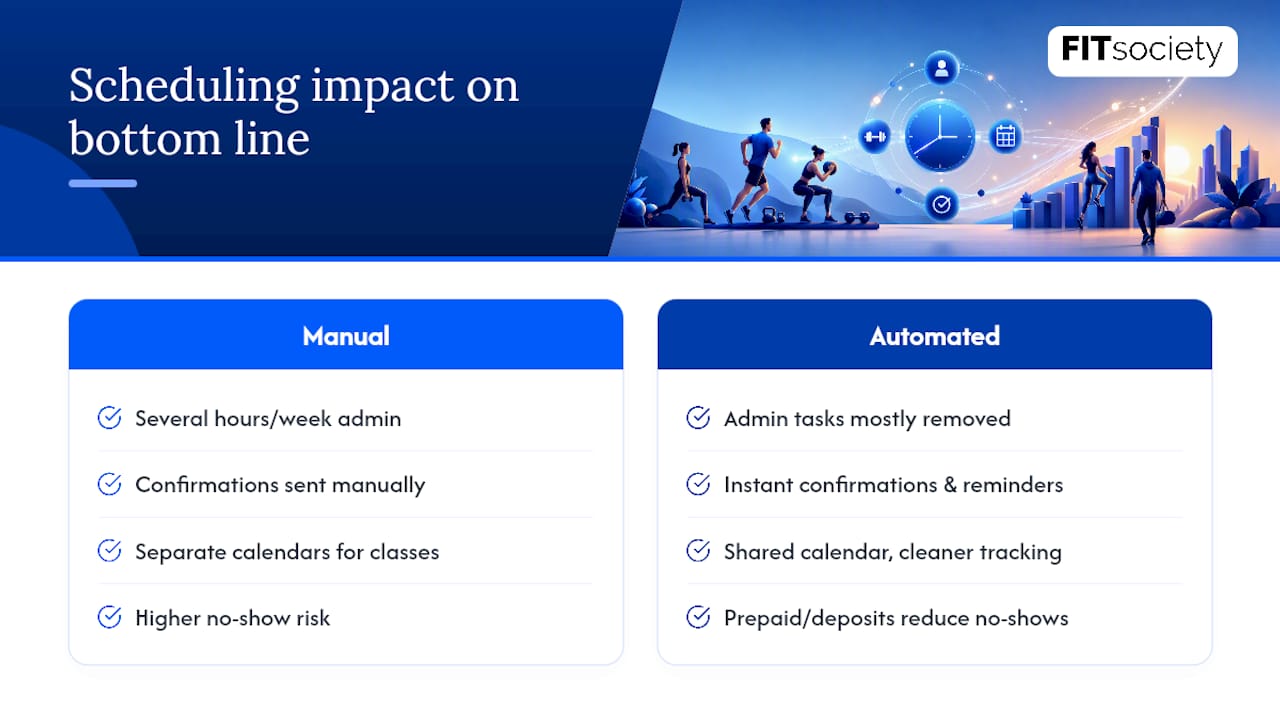
Automating bookings and reminders is not a convenience feature. It changes how many hours you spend on admin and how much revenue actually lands in your account each month.
Trainers running everything manually typically spend several hours a week just confirming sessions, chasing payments, and re-sending directions to a gym or studio. An automated confirmation and reminder sequence removes almost all of that back-and-forth, because the system sends it the moment a client books, not when you remember to.
The revenue case is just as direct. Prepaid packages and deposits change a client’s incentive to actually show up, since money already changed hands. Platforms that combine class and one-to-one scheduling report fewer double bookings and cleaner revenue tracking when everything runs against one shared availability calendar instead of separate systems for group classes and private sessions.
Calendar invites with location and video links, pushed to a client’s phone the moment they book, also reduce the “I forgot what time” no-show, which costs trainers more than most people admit.
How Do You Set Up Trainer Scheduling in One Afternoon?
You don’t need a week to get a working system live. Most trainers can go from spreadsheet chaos to a functioning personal trainer scheduling app in an afternoon if they work through the setup in order.
- Build your weekly availability template. Set recurring open slots and let the system auto-roll them forward each week, so you’re not rebuilding your calendar every Sunday night.
- Create your service entries. Define duration, capacity (solo versus small group), and price for each session type you offer.
- Pick your payment policy. Decide between a deposit, full prepayment, or invoicing, then connect a payment processor that carries PCI DSS compliance so you’re not storing card numbers yourself.
- Set your reminder cadence and cancellation window. A confirmation immediately, a reminder at 48 hours, and a final nudge at 2 hours works for most client bases. Add buffer time between sessions so a late finish doesn’t cascade.
- Embed the booking link. Put it on your website, your Instagram bio, and your email signature, then run one test booking yourself to confirm it lands correctly on your calendar.
- Migrate existing clients. Move recurring bookings out of spreadsheets or group texts and into the new system, and tell every client where to book going forward.
Pro Tip: Freeze new manual bookings for a 24-hour window while you migrate existing appointments, and send one automated message explaining the new booking page and any updated payment policy. Trying to run both systems in parallel for more than a day is how double bookings happen.
If you’re moving off spreadsheets or a shared group chat, a structured migration checklist prevents the exact chaos this step is designed to avoid.
Which Integrations Actually Prevent Double Bookings?
The integrations you connect determine whether your calendar for personal trainers stays accurate or slowly drifts out of sync with reality.
- Calendar sync, but the right direction matters: use two-way sync with Google or Outlook if you also book personal appointments there, and one-way display-only sync if the scheduling platform is your single source of truth.
- Video meeting integrations with Zoom or Google Meet that auto-generate a link the moment a session is booked, instead of you copying and pasting one manually.
- Payment processors chosen for PCI DSS compliance, since a platform that handles that responsibility directly removes a real liability from your business.
- Analytics dashboards tracking bookings, cancellations, revenue, and no-show rate over time, so you can spot a slipping pattern before it costs you a full month’s income.
- Staff logins and role permissions if you run multiple trainers or locations, so each trainer only sees and manages their own calendar.
Skipping two-way sync is the single most common cause of a trainer getting double-booked by their own gym schedule and their client-facing calendar simultaneously.
What Cuts No-Shows and Late Cancellations Fastest?
No-shows are rarely a discipline problem. They’re a communication and incentive problem, and both are fixable through the scheduling system itself.
- Send a confirmation immediately, a reminder at 48 hours, and a final one at 2 hours before the session, adjusting timing for new clients versus long-standing regulars.
- Require a deposit or full prepayment for new clients, and reserve flexible cancellation policies for clients with a proven attendance record.
- Turn on a waitlist so a canceled slot gets automatically offered to the next client instead of sitting empty.
- Write reminder copy that includes the session type, location or video link, and trainer name, not just a bare time stamp.
Pro Tip: Run a simple test: send half your reminders by SMS and half by email for a month, then compare no-show rates. Most trainers find SMS wins for last-minute confirmations, while email works better for the initial booking receipt.
Why Does an All-In-One Platform Outperform a Patchwork of Tools?
Trainers running separate apps for booking, payments, and client plans lose the connective tissue between them: a canceled session doesn’t update the payment record, and a rebooked client doesn’t automatically get their new training plan.
Booking, automated reminders, payment collection, and client-specific training and nutrition plans live in one interface, which means a rescheduled session doesn’t require you to manually update three other systems. Coaches using consolidated platforms report gains in perceived professionalism and client retention, largely because clients notice fewer scheduling errors and faster responses.
A few implementation lessons worth applying regardless of which platform you choose:
- Migrate one week of upcoming bookings first, verify they landed correctly, then move the rest.
- Send clients one clear message about the new booking link before disabling the old process entirely.
- Set your cancellation policy and reminder cadence before you go live, not after the first no-show; for practical guidance, check out these practical strategies to track fitness progress.
- Review your no-show and cancellation analytics monthly, not just when a pattern becomes obvious.
The goal isn’t more software. It’s fewer places where a booking can fall through the cracks. A consolidated platform approach tends to close that gap faster than adding another point solution.
How Should You Handle Last-Minute Cancellations and Refunds?
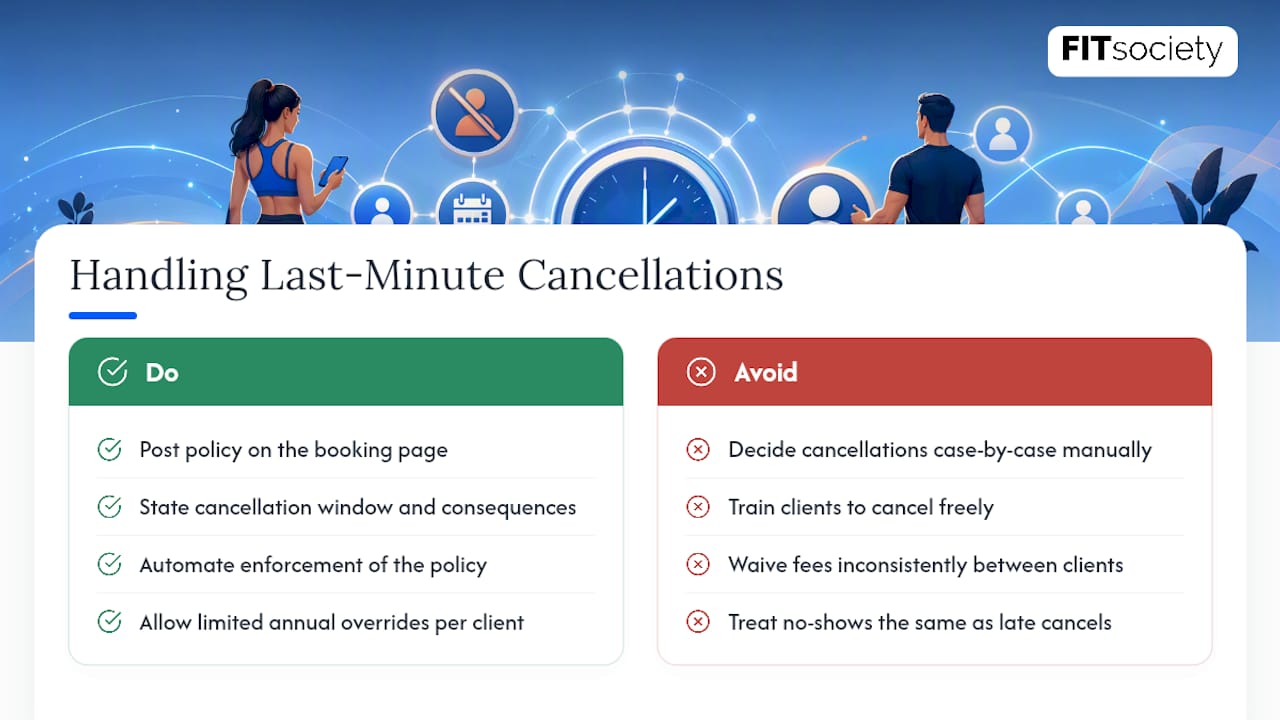
Your cancellation policy needs to be visible before a client books, not discovered after they try to cancel. State the cancellation window clearly on the booking page itself, making the consequence explicit: forfeited deposit, a rescheduling fee, or a credit toward a future session.
Automate the enforcement rather than deciding case by case. When a client cancels inside the window, the system should automatically apply the stated policy, whether that’s keeping the deposit or issuing a partial refund, without you having to manually process each exception.
Give yourself one lever for flexibility: a small number of policy overrides per client per year for genuine emergencies. This protects goodwill with regulars without training your entire client base to cancel freely at the last minute.
For no-shows specifically, distinguish the policy from late cancellations. A true no-show, someone who never messages at all, should carry a stricter consequence than a client who cancels two hours before with a real reason, since the two behaviors have very different revenue impacts on your week.
Refund requests outside your stated policy should route through one consistent decision, applied evenly. Trainers who make exceptions inconsistently, waiving fees for some clients and enforcing them for others, tend to see cancellation rates creep upward over time as word spreads about what’s actually tolerated.
What Changed When I Switched to an Integrated Scheduling Workflow
Trainers who move off spreadsheets and group texts consistently report the same shift: fewer double bookings, less time spent confirming sessions by hand, and clients who show up more reliably once reminders and payment happen automatically. The administrative hours saved tend to go straight back into programming and client check-ins, which is where a trainer’s time actually earns its keep. The pattern holds across trainers running solo one-to-one work and studios juggling group classes alongside private sessions.
— Matthijs
Get Your Scheduling Running With FITsociety
FITsociety replaces the booking app, the payment app, and the separate client-plan spreadsheet with one system built specifically for trainers and coaches. Your public booking page, automated reminders, deposit or full-payment collection, and each client’s personalized training and nutrition plan all live in the same account, so a rebooked session doesn’t require updating three other tools by hand.
If you’re moving off spreadsheets, WhatsApp threads, or a booking app that doesn’t talk to your payment processor, the migration checklist for switching platforms walks through exactly how to move existing clients over without losing a booking in transit. Trainers running both coaching and nutrition programming can also connect scheduling directly to nutrition and check-in workflows so a session booking and a check-in reminder come from the same place.
Set up your availability template and booking page on FITsociety this week, and see how much admin time disappears once bookings, reminders, and payments run themselves.
Sources
- Payment Card Industry Security Standards Council
- Nextro — Personal trainer booking software
FAQ
What Is the Best Scheduling App for Personal Trainers?
The best choice is a platform built specifically for trainers that combines self-booking, automated reminders, and payment collection in one place, rather than a general calendar app bolted onto a separate payment tool. Some platforms consolidate those functions alongside client training and nutrition plans in a single account.
How Much Is a One-Hour PT Session?
Pricing varies widely by region, trainer experience, and session format, so there’s no single standard rate. Your scheduling system should let you set and adjust session pricing directly against each service type, rather than negotiating price per booking.
Is $200 a Month for a Personal Trainer Good Value?
That depends entirely on session frequency and format included in the price, since a fixed amount for a small number of sessions is a very different value than the same amount spread over a larger number. Compare the per-session rate against your local market and what’s included, like nutrition guidance or check-ins, before judging the number alone.
How Many Days a Week Should I Meet With My Personal Trainer?
Most trainers recommend two to three sessions a week for clients balancing other training or activity on their own, though this varies by goal and experience level. Recurring package bookings in your scheduling system make it easy to lock in whatever cadence a client commits to.
Does Personal Trainer Scheduling Software Really Reduce No-Shows?
Yes. Automated multi-channel reminders combined with deposits or prepaid packages give clients both a nudge and a financial reason to show up, which consistently outperforms manual confirmation by text or memory alone.



