
Most fitness businesses running four or five tools should adopt an API-backed hub or migrate to a unified platform with selective routing for wearables and third-party apps. This fits coaches and studios juggling bookings, payments, and mixed data sources like wearables and legacy spreadsheets best. A read-only dashboard only makes sense as a short-term, low-risk bridge while you plan the real move.
TL;DR:
- Consolidation strategies should prioritize unified platforms or API-based integrations for long-term scalability and duplication removal, especially for multi-location businesses.
- OAuth, webhook, and polling methods are typical, but it’s critical to verify read/write capabilities and calendar sync behavior to prevent data inconsistencies and duplicate entries.
- Proper data merging relies on careful identity matching, normalization of metrics, and setting clear fusion rules before migration to avoid errors and protect data integrity.
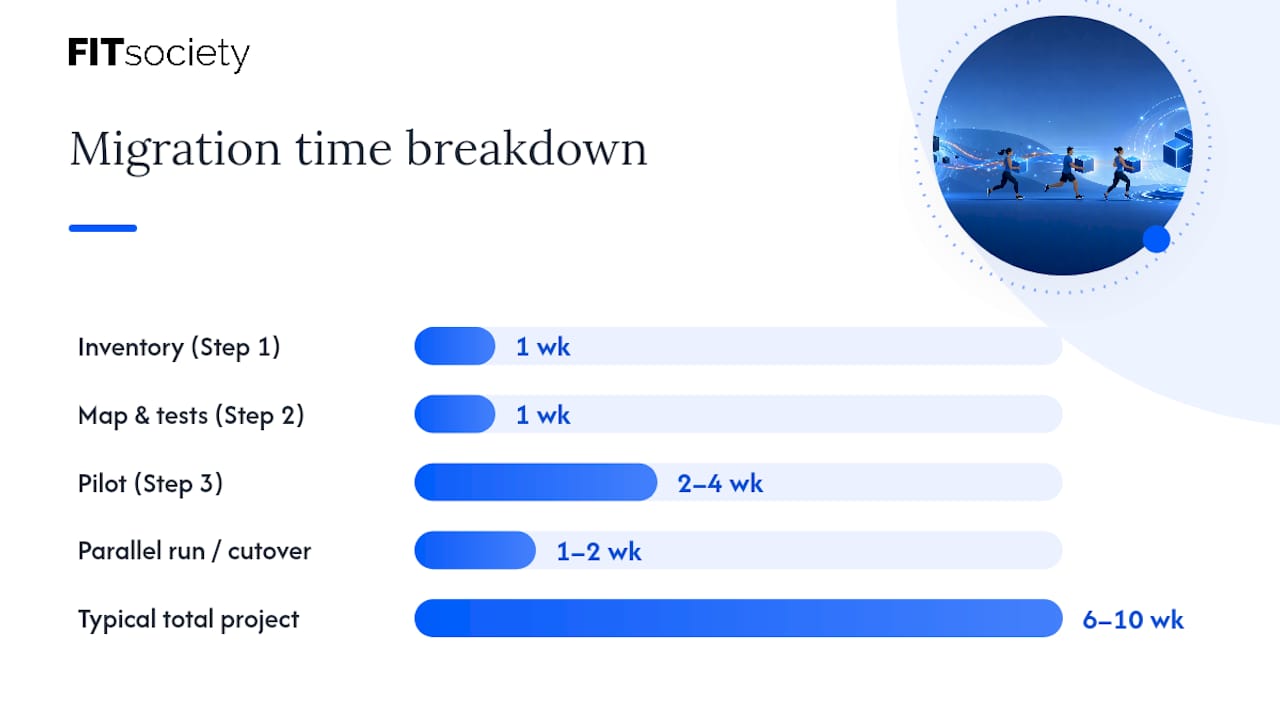
- A full migration usually takes six to ten weeks, starting with an inventory, mapping fields, running a pilot, and then staged cutover with post-migration validation.
- When evaluating vendors, prioritize calendar sync fidelity, payment reconciliation transparency, API documentation, and clear data ownership and migration support.
What Are the Main Ways to Consolidate Fitness Software?
Four approaches cover almost every consolidation scenario. Each trades speed against control differently, and picking the wrong one for your size wastes months.
Dashboard aggregation pulls data from multiple sources into one view without touching the underlying systems. Tools like FitnessSyncer work this way, aggregating health and fitness clouds into a single stream for visualization. It’s fast to set up and low risk, but it rarely fixes the double entry, billing mismatches, or scheduling conflicts that made you want to consolidate in the first place.
Bridge or router platforms sit between your existing tools and control where data flows. LinkLink positions itself this way, ingesting sources like Strava, WHOOP, Oura, and Garmin, then letting operators set rules for outbound routing so metrics don’t get double counted. This suits a solo coach or small studio that wants tighter control than a dashboard offers, without committing to a full platform switch yet.
Unified platforms replace the patchwork entirely. Bookings, payments, membership records, and coaching tools live in one system instead of being stitched together after the fact. This is the heaviest lift up front, but it’s usually the only route that removes duplication for good, and it’s the right call for a multi-location studio or a growing coaching business tired of reconciling three calendars by hand.
API-based integration means building or connecting through a developer-facing API to normalize data across tools. FitnessConnect offers a unified activity model and API built to pull wearable metrics like heart rate, steps, and sleep into a consistent schema. This route fits teams with development resources or a vendor that already exposes a documented API, and it scales better than manual dashboard wrangling as your client count grows.
Here’s how the trade-offs stack up:
- Dashboard: fastest to launch, lowest disruption, but doesn’t solve billing or scheduling duplication.
- Bridge/router: moderate setup time, good for controlling data flow between many wearable sources.
- Unified platform: highest short-term disruption, but the only option that removes ongoing duplication.
- API-first: best long-term scalability, but requires either in-house development or a vendor with real API documentation.
A temporary aggregator is fine while you’re evaluating a longer-term fix. It becomes a liability once your member count or coach headcount grows past what manual reconciliation can handle.
How Do Fitness Software Integrations Actually Work?
Every integration between your booking system, your payment processor, and a wearable data source follows a similar pattern, and understanding it helps you know what to test before you trust it.
Most connections start with OAuth: a member or coach authorizes access, the app receives a token, and that token refreshes periodically to keep the connection alive without asking for a password every time. After that handshake, data moves either through webhooks (the source pushes updates the moment something changes) or polling (your system checks in at intervals, say every 15 minutes). Webhooks are faster and lighter on both systems; polling is simpler to build but can lag behind real activity.
The bigger distinction is read-only versus read/write. A read-only connection pulls data in but never pushes anything back. That’s safer, but it means a correction made in your hub won’t sync back to the original source. Read/write connections can update both sides, which is more useful but introduces a real risk: sync loops, where two systems keep re-triggering updates to each other. FitMesh’s own documentation flags this directly, noting that it can write fused results back to platform health stores only where that flow is supported, and recommends checking a compatibility table before assuming write-back will work.
Calendar sync deserves its own scrutiny. If you’re testing Google Calendar or Microsoft Outlook/Microsoft 365 integrations, verify these specifically:
- Two-way sync idempotence (does re-syncing the same event create duplicates?)
- Time zone handling across coach and client calendars in different regions
- Behavior when a booking is edited on one side after the sync already ran
FITsociety’s calendar feature is built for group classes, small-group sessions, one-to-one appointments, and online PT, with Google Calendar and Microsoft Outlook/Microsoft 365 integrations. Confirm current sync behavior and plan availability directly on that page before you commit a migration date around it.
Payment integrations carry a different risk profile. Subscription billing tools often restrict what an external system can modify, so verify what your reconciliation report actually shows: does it flag failed charges, refunds, and plan changes at the same granularity your current system does?
Pro Tip: Run every new integration in parallel with your existing system for at least one full billing cycle before switching off the old one. A sync bug that looks fine on day three can surface as a duplicate charge on day thirty.
How Do You Build a Reliable Data Model for Consolidated Records?
Consolidation only works if the merged data is trustworthy. That means deciding, in advance, how you’ll handle the same client showing up in three different systems with three slightly different records.
-
Match identities carefully. Use email plus phone number as a combined key rather than name alone, since duplicate names and nicknames are common in member databases. Build a manual review queue for any match below a confidence threshold instead of auto-merging.
-
Normalize metrics before comparing them. Steps, heart rate, and sleep data arrive in different units and time formats depending on the source. FitnessConnect’s normalized activity schema approach exists specifically to solve this: standardizing metrics once means every downstream app or coaching dashboard reads the same format instead of remapping per vendor.
-
Set fusion rules before you need them. When two sources report the same workout, don’t add the numbers together. Pick the most complete source as the primary record and use the secondary source only to fill genuine gaps.
-
Tag provenance on every record. Store which system a data point came from and when it last synced. Without this, a read/write loop can silently overwrite a correct manual entry with a stale automated one.
-
Normalize time zones at the point of entry, not later. A class booked at 6 p.m. local time needs to stay 6 p.m. local time regardless of which server processed the sync.
-
Run a daily reconciliation check during the transition period: pick five member accounts and manually verify their bookings, payments, and progress data match across old and new systems.
FitMesh’s own guidance on deduplication is worth following closely here: it combines wearable and platform data into one dashboard and deduplicates overlapping metrics before any write-back happens, which is the right order of operations. Fuse and clean first. Write back second.
Your Step-by-Step Migration Checklist and Timeline
A realistic consolidation migration runs six to ten weeks for a small studio, longer for a multi-location business with several coaches and legacy payment contracts. Rushing the inventory step is the single most common cause of a messy cutover.
Step 1: Inventory everything (Week 1). List every app currently in use, including the ones nobody remembers signing up for. For each one, record:
- What data it holds (members, bookings, payments, progress notes, wearable feeds)
- Whether it has an export function and what format it produces (CSV, JSON, API)
- Active member count and any recurring payment schedules tied to it
- Calendar connections currently live (Google Calendar, Outlook, both)
Step 2: Map fields and define acceptance tests (Week 2). Decide how each field in your old systems maps to the new one. Write down what “success” looks like before you migrate anything: a successful member import means 100% of active members transfer with correct contact info and membership status; a successful booking reconciliation means every future-dated session appears exactly once with the right coach assigned; a successful payment match means every active subscription continues billing on the same cycle with no gap or double charge.
Step 3: Run a pilot (Weeks 3 to 6). Migrate a small cohort, ideally 10 to 15 clients who represent your typical mix of membership types, booking patterns, and payment methods. Run this pilot for two to four full weeks, long enough to hit at least one full billing cycle and one week of normal class scheduling. Reconcile daily during the first week, then every few days after that.
Step 4: Plan the staged cutover. Once the pilot reconciles cleanly, communicate the change to remaining members with a specific date and what to expect (a brief app switch, a new login, no interruption to existing bookings). Run both systems in parallel for one to two weeks, treating the old system as the source of truth until the new one proves stable. On cutover day, freeze new entries in the old system, do a final export, and confirm every booking and payment record landed correctly before shutting the old system down.
Step 5: Monitor post-cutover. Check payment reconciliation daily for the first two weeks, verify booking integrity for the following month’s calendar, and keep a visible support channel open for staff and clients hitting friction with the new interface.
Pro Tip: Pick your pilot cohort from clients who message you often. They’ll surface friction fast, and you’d rather hear about a sync issue from someone you talk to weekly than discover it from a billing complaint a month later.
For a full checklist you can adapt directly, FITsociety’s guide on implementing fitness software without chaos walks through member communication templates and cutover sequencing in more detail, and the switching gym software without disruption checklist covers payment and team-specific steps.
What Should You Look For When Choosing a Consolidation Route?
The right vendor or approach depends on which risks matter most to your business. A studio with tight cash flow cares more about payment reconciliation fidelity than API depth; a coaching business with 300 remote clients cares more about calendar sync reliability than in-person check-in speed.
Ask these questions in any demo before signing anything:
- Does calendar sync run two-way, and how does it handle edits made after the initial sync?
- What exactly does the payment reconciliation report show, and can you export it?
- Is there a documented public API, and can you see the docs before you commit?
- How are coach and staff roles and permissions managed, especially across multiple locations?
- What happens to your data if you leave? Is full export included or a paid add-on?
- What migration support is offered, and is there a written timeline or SLA?
Watch for two red flags in particular. First, a platform that offers read-only access with no stated migration path out of it. That’s a sign you’ll be locked into manual exports indefinitely. Second, vague answers about who owns exported data. Roundup reviews of gym management platforms consistently show that scheduling, CRM, and integration depth are the features operators actually judge vendors on, which lines up with what actually causes migration pain in practice.
| Criteria | Why It Matters | Ask During Demo |
|---|---|---|
| Calendar sync fidelity | Prevents double-booked or missing sessions | Does it handle two-way edits without duplicates? |
| Payment reconciliation | Avoids billing errors during and after migration | Can you export a full reconciliation report? |
| API and documentation | Determines long-term flexibility | Is the API public and documented before signup? |
| Roles and permissions | Matters for multi-coach or multi-location teams | Can permissions be set per coach or location? |
| Data export options | Protects you if you switch again later | Is full export free and self-service? |
| Migration support | Determines how smooth the cutover actually goes | Is there a written timeline or dedicated contact? |
Where FITsociety Fits If You’re Ready to Consolidate
FITsociety is community-driven fitness software built with input from coaches, studio owners, and gyms who use it daily. It brings bookings, memberships, payments, training and nutrition plans, and progress tracking into one dashboard for coaches, with a client portal and mobile apps on the other side.
The booking calendar is built specifically for the mix most studios actually run: group classes, small-group sessions, one-to-one appointments, and online PT, all in the same schedule. It connects with Google Calendar and Microsoft Outlook/Microsoft 365, so coaches don’t have to abandon the calendar tools they already rely on. FITsociety also offers a public API and MCP support for teams building connected workflows on top of the platform, worth checking directly if your migration plan depends on specific endpoints or permissions.
If you’re currently juggling separate booking, payment, and coaching tools, the personal trainer software guide walks through what moving from scattered tools to one platform actually looks like in practice. Plans run from Coach to Team to Club, with increasing member and coach limits and features like roles, permissions, and a white-label app. Current pricing details are available on the pricing page. Check current pricing and plan details directly, since limits and add-ons can change.
If your business runs multiple coaches or locations, the business page covers team-scale setup and permissions in more depth. Start there to see whether your current tool stack maps cleanly onto one plan.
Where to Verify Integration and Migration Details
Before finalizing any consolidation plan, confirm read/write status and current documentation directly at the source:
- FitMesh’s compatibility documentation for wearable sync and write-back limits
- FitnessConnect’s API reference for normalized activity schemas
- Open Wearables on GitHub if you’re considering a self-hosted integration layer
Sources
- Sync Fitness Data Across Apps and Wearables | FitMesh
- One API. — FitnessConnect
- the-momentum/open-wearables
FAQ
What Does It Mean to Consolidate Fitness Software?
Consolidating fitness software means combining tools you currently run separately, such as booking, payments, member management, and wearable tracking, into one connected system or a smaller number of integrated ones. The goal is a single reliable record for each client instead of scattered, conflicting data across apps.
Should I Choose a Dashboard or a Full Platform Migration?
A dashboard works as a quick, low-risk fix while you evaluate longer-term options, but it doesn’t remove the duplicate entry and reconciliation work that usually drives the decision to consolidate. A full platform migration takes more setup time but is generally the only route that eliminates that duplication for good, especially for a growing studio with multiple coaches.
How Long Does a Fitness Software Migration Take?
A small studio typically needs six to ten weeks for a careful migration, including a pilot run with a small cohort of 10 to 15 clients over two to four weeks. Multi-location businesses or teams with complex payment setups should plan for longer, given the added coordination across staff and billing cycles.
Does FITsociety Support Calendar Integrations?
Yes. FITsociety’s booking calendar connects with Google Calendar and Microsoft Outlook/Microsoft 365, supporting group classes, small-group sessions, one-to-one appointments, and online PT in one schedule. Check the calendar feature page directly for current sync behavior and plan-specific availability.
What’s the Risk With Read/Write Integrations Versus Read-Only?
Read-only connections are safer because they never push changes back to the original source, but corrections made in your hub won’t sync backward. Read/write connections are more useful but carry a real risk of sync loops, where two systems keep re-triggering updates to each other, so testing this behavior before full rollout matters.
Does FITsociety Have a Public API?
Yes. FITsociety offers a public API and MCP support for connected coaching workflows. Verify specific endpoints, supported actions, and plan-level access directly with FITsociety before building a migration plan around them.



