

Stripe works well as a primary payment processor for most independent trainers and small coaching teams, thanks to flexible billing tools and standard card rates. The real trade-off is admin overhead: Stripe alone handles money but not bookings, reminders, or client records. Trainers who need bookings and payments under one roof, without stitching together separate tools, tend to do better with an integrated platform like FITsociety, which layers Stripe payments on top of scheduling and client management.
TL;DR:
- Using Stripe alone limits automation for bookings and client management, making it best suited for low-volume solo trainers with simple payment needs.
- Once monthly revenue exceeds approximately $3,000 to $5,000 or multiple coaches share clients, manual reconciliation becomes time-consuming and an integrated platform is preferable.
- Stripe Billing is essential for recurring memberships, while Payment Links and Wallets reduce friction for one-off sessions and mobile checkout.
- ACH transfers save costs on high-value transactions over card payments, which carry a 2.9% plus $0.30 fee per transaction in the US.
- Connecting Stripe through prebuilt plugins or a platform like FITsociety streamlines workflows, eliminating manual matching and keeping booking, client records, and payments unified.
Is Stripe Payments for Trainers the Right Choice for You?
The answer depends on how your business actually runs, not just how you want to get paid. Three trainer profiles show up again and again, and each one leans a different direction.
The solo trainer running sessions and small packs. Stripe’s Payment Links let you send a checkout page by text without building a website. Low volume, low complexity, minimal reason to look elsewhere.
The trainer running memberships or recurring programs. Stripe Billing handles card-on-file, retries, and trial periods, but you still need something tracking who booked what session and whether they showed up. That gap is where a standalone processor starts to strain.
The small team managing multiple coaches, calendars, and client rosters. Here, a processor by itself creates real friction. Someone has to manually match payments to bookings, chase failed cards, and keep records straight across coaches.
Stripe’s advantages are genuine: proven infrastructure, flexible product configuration, and support for one-time, recurring, and international payments in a single account, as Stripe’s own documentation shows. What it doesn’t do is coordinate that payment with a calendar slot, a client’s training plan, or a reminder email.
Three triggers signal you’ve outgrown a processor-only setup:
- Monthly revenue above roughly $3,000 to $5,000 with recurring clients, where manual reconciliation starts eating hours weekly
- Multiple coaches sharing a client roster, where payment records need to sync automatically to bookings
- Limited time or comfort with manual bookkeeping and spreadsheet tracking
What Stripe Features Actually Matter for Trainer Billing
Stripe isn’t one tool. It’s a set of products, and matching the right one to the right workflow matters more than which processor you pick.
Stripe Billing covers memberships and multi-session packages. It manages free trials, automatic retry logic when a card fails, and stores card-on-file details securely so clients aren’t re-entering payment info every month. This is the backbone for any trainer running recurring revenue.
Payment Links and Invoicing fit single sessions and one-off pack sales. No website or checkout page required. You generate a link, send it, and the client pays. Industry coverage of payment tools for trainers points to this kind of low-friction, mobile-first checkout as one of the features trainers value most.
Wallets like Apple Pay and Google Pay cut checkout friction significantly on mobile, where most trainer-client communication and booking now happens. A client booking from their phone between errands is far more likely to complete a payment with one tap than to type in a 16-digit card number.
ACH and bank transfers matter for high-ticket programs. A $2,000 coaching package processed by card can carry a meaningfully higher fee than the same transaction routed through ACH, since bank transfers typically carry lower fixed fees than card networks.
- Use Stripe Billing for memberships, ongoing packages, and anything recurring
- Use Payment Links for single sessions, drop-ins, and simple pack sales
- Use Invoicing when a client needs a formal, itemized bill (common for corporate wellness contracts)
- Enable wallets on every checkout to reduce mobile drop-off
- Offer ACH for programs over roughly $500 to cut fee drag
Pro Tip: Add metadata to every Stripe transaction, like the client name, session date, and program type, and set up automatic receipt emails. When a dispute comes in, that trail of session logs and confirmations is what makes the difference between fighting a chargeback blind and having the evidence Stripe needs already attached to the charge.
What Do Stripe Fees Actually Cost a Trainer?
Stripe’s standard card rate in the U.S. is 2.9% plus $0.30 per successful transaction, according to Stripe’s pricing documentation, with cross-border and currency-conversion transactions adding extra fees on top.
Fee example: A $1,000 coaching program charged by card costs $29 plus $0.30, or $29.30 in Stripe fees. That leaves you with $970.70 net. Run that same charge through ACH instead, and the flat, lower-fee structure typically leaves noticeably more in your pocket, since ACH doesn’t carry the percentage-based card rate.
Payout timing depends on account history. New Stripe accounts often see payouts land on a rolling 2-to-7-day schedule at first, moving faster as the account builds a track record. Instant payout options exist for eligible accounts at an added cost, useful if you need same-day access to funds rather than waiting for the standard schedule.
Chargebacks are the real risk for coaching businesses, since sessions are a service, not a shippable good. When a client disputes a charge, Stripe asks for evidence: a signed contract or waiver, session attendance logs, and any written communication confirming the client agreed to the service and its refund terms. Processors that route disputes through standard card-network rules, which Stripe does, tend to give trainers a clearer path to contest a chargeback than platforms built around buyer-protection-first policies, which can work against sellers of non-refundable coaching packages.
How Do You Connect Stripe to Your Booking Software?
Two integration paths exist, and picking the wrong one creates work you’ll regret later.
Stripe Connect lets a booking platform route payouts directly into a trainer’s own bank account rather than holding funds centrally. Booking apps built for trainers commonly use this pattern, since it keeps payment ownership with the trainer and simplifies reconciliation instead of funneling every dollar through a platform’s own account first.
Account-based integrations connect your existing Stripe account to a booking platform without the Connect layer, useful for a solo operator who wants to keep full control of a single Stripe dashboard.
FITsociety documents its calendar and booking system with built-in payment integration, meaning bookings, client records, and payment status sit in one dashboard instead of three separate tools. When a client books a session, the payment and the calendar slot are tied together automatically, which removes the manual matching that eats time for growing teams.
For most independent trainers, a plugin or prebuilt integration inside a booking platform covers everything needed. Custom API work only makes sense when you’re building a workflow no existing platform supports, and FITsociety’s public API and MCP support exist specifically for that kind of connected, custom workflow.
- Stripe Connect: best when you need direct payouts and multiple coaches on one system
- Account-based integration: best for a solo trainer with simple needs
- Prebuilt plugin: fastest path for most trainers, no development required
- Custom API: reserved for advanced, connected workflows beyond standard booking
Before choosing, confirm who owns the client payment data and how easily you can export it if you ever switch platforms. Locked-in data is a bigger long-term cost than a slightly higher processing fee.
Setting Up Stripe Payments: A Step-by-Step Checklist
Going live with card and recurring payments tied to bookings follows a predictable sequence. Skip a step, and you’ll find yourself troubleshooting mid-launch instead of before it.
- Create and verify your Stripe account. Expect to provide a government ID, bank account details, and business information; verification typically takes a few business days.
- Choose your billing flow. Payment Links for one-off sales, Invoicing for formal bills, Stripe Billing for anything recurring like memberships.
- Add your products. Set up each offering, single session, multi-session pack, monthly membership, with its own price and description.
- Set refund policy and tax settings. Decide upfront whether packages are refundable and configure any applicable tax collection before your first sale.
- Enable wallets. Turn on Apple Pay and Google Pay in your checkout settings to cut mobile friction.
- Test in sandbox mode. Run sample transactions before going live, and confirm receipts, retries, and failed-card handling all behave as expected.
- Prepare dispute documentation templates. Draft a standard waiver and session-log format now, before you ever need it for a chargeback.
- Connect to your booking platform. If using FITsociety, verify calendar sync and confirm payout routing matches your expectations.
Pro Tip: Run at least one real test transaction with a $1 charge before launch, even after sandbox testing. Sandbox environments don’t always surface the same card-decline behavior or receipt formatting you’ll see in production.
What Do Trainers Actually Net After Fees?
Numbers matter more than percentages when you’re deciding what to charge. Here’s what four common trainer offerings net after standard card processing.
The pattern holds across every tier: card fees run roughly 2.5% to 3.5% of the total once the flat $0.30 is factored in, with the percentage impact shrinking slightly as the transaction size grows. For the $1,000 program, switching to ACH instead of card can meaningfully reduce that fee drag, since ACH transfers skip the percentage-based card rate entirely.
Where does a monthly SaaS subscription start making more sense than a pure per-transaction processor? Once you’re running enough recurring memberships and bookings that the admin time saved, no manual invoice chasing, automatic receipts, synced calendars, outweighs a flat monthly software cost. For a trainer processing even a modest volume of recurring payments each month, that math tends to favor an integrated platform over stacking separate booking and payment tools.
Security and Compliance: What Trainers Need to Know
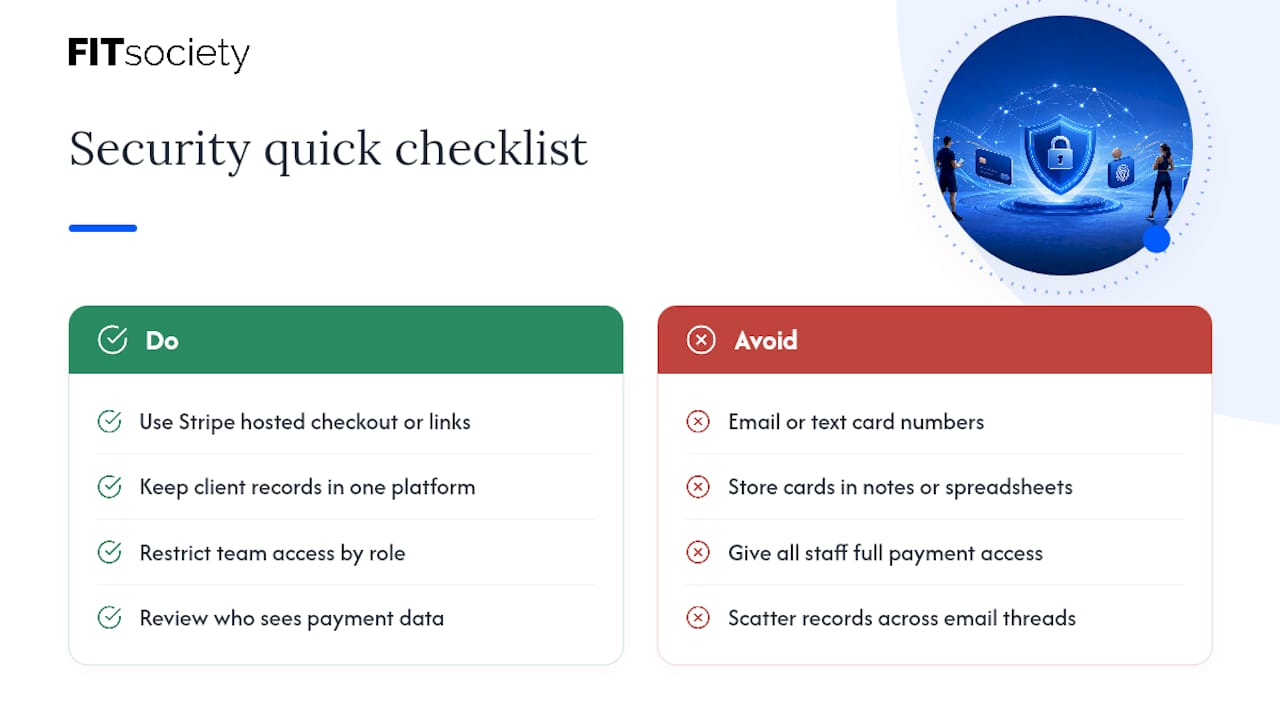
Stripe handles PCI DSS compliance at the infrastructure level, meaning card data never touches your own servers or spreadsheets when you use Stripe’s hosted checkout, Payment Links, or Billing. That matters more than it sounds: a trainer manually typing card numbers into a device or storing them in a notes app creates real compliance and liability exposure that Stripe’s hosted tools are built to eliminate.
Client data privacy is a separate concern from payment security. Names, contact details, health information from intake forms, and session history all need protection independent of how payments are processed. If you’re using a booking platform alongside Stripe, check where client records live and who can access them. A platform that keeps client data and payment status in one permissioned dashboard, rather than scattered across spreadsheets, email threads, and a separate payment dashboard, reduces the number of places sensitive data can leak.
Two practical habits matter here. First, never ask a client to email or text a card number, ever, even for a “quick” one-time charge. Use a Payment Link instead. Second, review who on your team has access to payment and client data, especially if you’re running a small staff. Not every coach needs visibility into every client’s payment history.
Stripe’s own account settings let you restrict payout access and set role-based permissions if you’re operating with multiple team members, which is worth configuring before your team grows past you and one other coach.
Handling International Clients and Multiple Currencies
Online coaching rarely stays local for long. A client base spread across countries means Stripe needs to handle currency conversion and cross-border processing, and both carry costs beyond the standard domestic card rate.
Cross-border fees apply whenever a client’s card is issued in a different country than your Stripe account’s home country, and currency-conversion fees apply on top when you’re charging in a currency other than your default. Stripe supports charging clients in their local currency, which tends to improve checkout completion since clients see familiar pricing rather than a foreign-currency conversion at checkout.
A few practical habits help here:
- Set clear pricing per region if you serve multiple countries regularly, rather than converting one price on the fly for every transaction
- Decide upfront whether you absorb currency-conversion fees or pass them to the client, and state that policy clearly before the first international sale
- Keep payout currency consistent with your primary bank account to avoid unnecessary conversion steps on your end
For a trainer with only one or two international clients, the added fee is usually small enough to absorb. For a coaching business built around a global client base, multi-currency pricing configured properly at the product level saves real money over charging everyone in a single default currency.
Troubleshooting Common Payment Issues Trainers Run Into
Most payment problems trainers hit fall into a handful of repeat patterns, and most have a fast fix once you know what’s happening.
Failed recurring charges. A membership payment fails, usually because a card expired or a bank flagged the charge. Stripe Billing’s automatic retry logic catches most of these within a few days, but set up an email alert so you know when a retry ultimately fails and a client needs a manual nudge.
Client claims they were charged twice. This is almost always a duplicate submission on a slow connection, not a real double charge. Check the Stripe dashboard for the actual charge history before refunding anything; the second “charge” the client sees is often just a pending authorization that clears on its own.
Disputed high-ticket packages. A client disputes a $1,000 program weeks after starting it. This is exactly why documentation matters upfront: a signed agreement, attendance records, and a clear refund policy stated before purchase are what resolve these disputes in your favor.
Checkout abandonment on mobile. If clients start a booking but don’t complete payment, wallet support is usually the fix. A client who has to manually type card details on a phone is far more likely to abandon than one who taps Apple Pay.
Confused clients about billing dates. Recurring memberships that don’t clearly state the billing date generate more support questions than any other issue. State the exact charge date in your onboarding materials and confirmation emails.
How FITsociety Simplifies Stripe Payments for Trainers
FITsociety is community-driven fitness software built with trainers, and actively improved through the feedback of the fitness professionals using it. Instead of running Stripe as a standalone tool bolted onto a separate booking calendar, FITsociety bundles booking and payments into a single dashboard: session bookings, group classes, small-group sessions, and online PT all sync to payment status automatically.
That means no manually matching a Stripe payment to a calendar slot, no chasing a client for a missed membership charge, and no separate spreadsheet tracking who paid for what. Receipts generate automatically, calendar sync works with both Google Calendar and Microsoft Outlook/Microsoft 365, and a client’s payment history sits next to their training plan and progress notes in the same client portal.
FITsociety’s Coach plan runs $179 per month for up to 100 members and 2 coaches, with the Team plan at $289 per month for larger rosters and multiple coaches with role permissions. Some plans may also include yearly billing options. For a small team weighing a standalone Stripe setup against an integrated platform, the coaching-specific features are worth a direct look before deciding which route fits your business.
Sources
- Stripe
- The best payment solutions for personal trainers
FAQ
How Much Is the Stripe Fee for $1,000?
At Stripe’s standard U.S. card rate of 2.9% plus $0.30, a $1,000 charge costs $29.30 in fees, leaving $970.70 net. ACH or bank-transfer options typically cost less for transactions at this size, since they skip the percentage-based card rate.
What Are the Disadvantages of Using Stripe?
Stripe alone doesn’t manage bookings, client records, or reminders, so trainers relying only on Stripe often end up juggling a separate calendar and spreadsheet. Card fees can also add up for high-ticket programs compared to ACH, and international transactions carry extra cross-border and currency-conversion costs.
Does Elon Musk Own Part of Stripe?
Elon Musk was a cofounder of X.com, which later became part of PayPal, a different company from Stripe. Stripe was founded separately by Patrick and John Collison, and there’s no public record connecting Musk to Stripe’s ownership.
Who Is Stripe’s Biggest Competitor?
Stripe competes with several payment processors and platforms across the broader payments industry, each with different fee structures and dispute-handling approaches. For trainers specifically, the more useful comparison isn’t processor versus processor but whether a standalone processor meets your needs or whether an integrated platform like FITsociety, which layers Stripe payments onto bookings and client management, fits your workflow better.
How Do I Use Stripe as a Trainer Without a Website?
Stripe’s Payment Links let you generate a checkout page and send it directly by text or email, no website needed. This covers single sessions and pack sales; for recurring memberships, Stripe Billing handles the subscription logic without requiring a custom site either.



