
Launching paid remote personal training requires four things: a reliable device with a working camera, at least 5 to 10 Mbps of upload speed, a scheduling and payment workflow, and one delivery platform (or a lightweight coordinated stack) to run sessions on. Everything else is refinement. The immediate next step: run a full session tech check today and book one paid pilot session this week rather than waiting for a perfect setup.
TL;DR:
- Trainers should run a complete tech check and book a paid pilot session immediately to test their setup before launching fully.
- Selecting a niche with a clear, screen-appropriate goal ensures the service model aligns with the trainer’s tech and client needs.
- Essential legal documents include liability releases, health history forms, cancellation policies, and clear payment terms to manage liability risks.
- A high-quality home studio demands reliable bandwidth, a dedicated camera, appropriate angles, clear audio, and soft lighting for professional sessions.
- Using an integrated platform like FITsociety streamlines intake, scheduling, delivery, and billing, reducing admin overhead and sync failures.
Choosing Your Niche and Service Model for Remote Training
The trainers who struggle most online usually skipped this step. They tried to serve everyone, offered every service format at once, and ended up managing three different tech setups for three different client types.
Pick a niche using three filters: does this group have a real, felt need; can they pay for ongoing coaching; and does their goal actually translate to a screen? Postpartum strength recovery, desk-job mobility, and marathon-adjacent conditioning all translate well. Complex barbell technique corrections for total beginners translate poorly without hands-on spotting.
Your service model determines your entire tech stack, so decide this before buying a single piece of gear.
- Live 1:1 sessions: highest engagement, requires the best camera angle and lowest latency tolerance.
- Small-group live sessions: needs a platform with reliable multi-participant video and clear speaker visibility.
- Asynchronous programming with async check-ins: lowest tech bar, relies heavily on your software’s messaging and video upload features.
- Hybrid: one live session weekly plus programmed independent days, the most common model among established online coaches.
Run this exercise before you build anything: write one sentence naming your ideal client, their primary goal, and which of the four models above serves that goal fastest. If you can’t finish that sentence cleanly, your offer is still too broad. Narrow it until you can.
What Legal Documents and Admin Systems Do You Need First?
Remote training carries the same liability exposure as in-person work, arguably more, since you can’t physically spot a client or stop a rep mid-movement. Four documents are non-negotiable before your first paid session.
- Liability release and informed consent, specific to remote or virtual delivery language.
- Par-Q or health history intake form, screening for cardiovascular risk factors and injury history.
- Written cancellation and no-show policy, stated in hours (24 to 48 is standard) with the fee or credit consequence spelled out.
- Payment terms, covering billing cadence, refund conditions, and what happens on a missed autopay.
Collect emergency contact information and the client’s physical address during intake, not after an incident. If someone tears a hamstring mid-squat with nobody else in the room, you need to know exactly where they are and whom to call. NASM’s guidance on building an online training business treats this as a baseline intake requirement, not an optional extra.
Sample cancellation policy language: “Sessions canceled with less than 24 hours’ notice are charged in full. Sessions canceled with less than 2 hours’ notice or missed entirely count as a used session.” Enforce it consistently from client one, or it becomes unenforceable by client ten.
Keep bookkeeping simple from day one: log every payment, issue invoices for corporate or reimbursable clients, and separate personal and business accounts early.
Pro Tip: Local tax rules for service-based self-employment vary by jurisdiction. Verify your specific obligations with a local accountant rather than relying on generic online guidance.
What Equipment Do You Need for a Professional Home Studio?
Your camera setup matters more than your walls, your lighting, or your ring light collection. A trainer who can clearly see a client’s knee tracking on a squat, with stable audio, outperforms a trainer with a beautifully decorated background and a laggy connection every time.
Bandwidth first. Aim for a minimum of 5 to 10 Mbps upload and download for stable HD video without freezing. Wired Ethernet beats Wi-Fi for reliability, especially if your router sits far from your training space or your household shares bandwidth with streaming devices during peak hours.
Devices. NASM recommends running two devices: one dedicated to the camera feed so you never lose visual contact, and a second for pulling up notes, cueing scripts, or the client’s program without turning your back on the frame. A tablet propped at hip height works fine for the second device.
Camera angle. Position your primary camera at roughly hip to chest height, angled to capture full-body movement during compound lifts. For lower-body screening, a slightly lower angle showing knee and ankle alignment beats a straight-on headshot framing.

Audio. Built-in laptop microphones pick up room echo badly in most home spaces. A basic USB microphone or a wired headset with a mic solves this without much cost. Echo usually comes from hard flooring and bare walls, so training in a carpeted room or one with soft furnishings improves clarity noticeably.
Lighting. Face a window or a simple ring light; never position your main light source behind you, since backlighting turns you into a silhouette and makes movement cues impossible to read.
Run this checklist 30 to 60 minutes before every session, a habit that reduces mid-session disruptions significantly:
- Test camera framing and confirm full range of motion is visible.
- Test microphone levels with a client-side volunteer or a recording playback.
- Confirm internet speed with a quick speed test.
- Have a phone hotspot ready as backup connectivity.
- Keep a second device charged and logged into your platform as a fallback if the primary fails.
Bodyweight programming and inexpensive resistance bands cover most early remote clients well; you don’t need a home gym’s worth of equipment to run a functional home studio setup for a credible virtual training session on day one.
Which Software Workflow Actually Runs Your Business?
Every remote coaching business runs the same five-step loop: intake, assessment, scheduling, delivery, and billing. The question isn’t whether you need software for this. It’s whether you run all five steps on one platform or stitch together separate tools for each.
A single integrated workflow, intake through scheduling through delivery through tracking through billing, cuts admin time compared to juggling a form builder, a separate calendar app, a messaging app, and a payment processor that don’t talk to each other.
Software supporting this workflow needs, at minimum:
- Client profiles that store intake forms, health history, and program history in one place.
- Calendar sync with tools like Google Calendar or Microsoft Outlook so bookings don’t double-schedule against your personal calendar.
- Built-in messaging for check-ins between sessions.
- Program and nutrition plan delivery clients can access from a mobile app.
- Payment processing and subscription billing tied directly to session bookings.
- Automated reminders for upcoming sessions and check-in due dates.
If you’re piecing together a stack instead, map each tool to one job only: a scheduler, a separate payment processor, a separate messaging channel, a separate progress tracker. It works, but every added tool is another login, another sync failure point, and another place a client’s information can go stale.
Before launch, configure whichever route you choose: build your intake form, connect your calendar, set your cancellation policy into the booking flow, and test one full mock client cycle end to end before a real client hits it.
How Do You Structure a Remote Session That Actually Keeps Clients Engaged?
Copying your in-person session format onto a video call is the single most common mistake trainers make when they go remote. Training design research consistently shows that virtual sessions need chunking and frequent interaction built in, not bolted on as an afterthought.
Attention on a screen degrades faster than attention in a room. Redesigning content for virtual delivery, rather than just transplanting it, can shorten the effective live session length by roughly 30 to 40 percent while making the time you do use far more interactive.
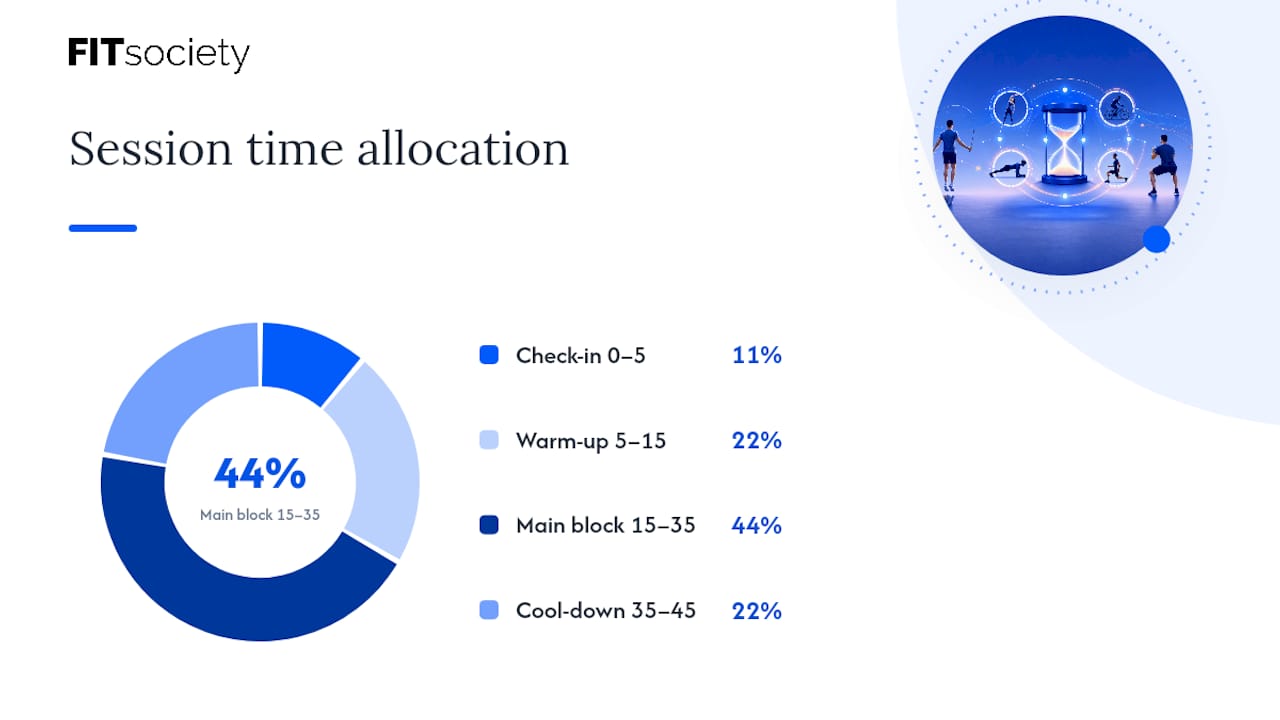
A workable 45-minute session template:
- Minutes 0 to 5: check-in, quick subjective read (energy, soreness, sleep).
- Minutes 5 to 15: warm-up with a verbal cue every set, not silent counting.
- Minutes 15 to 35: main work block, broken into 2 to 3 movement chunks with a form check or a question after each.
- Minutes 35 to 45: cool-down plus one specific, written note logged for next session.
Micro-interactions, short questions or form checks every three to five minutes, keep clients from mentally checking out mid-set, a pattern borne out in virtual training engagement research.
Pair live sessions with asynchronous assets between calls: a 30-second video demo of a new movement, a daily habit log, or a short written check-in form. Blending live coaching with on-demand content extends your reach without adding live hours to your calendar.
Track progress with both subjective markers (energy, motivation, soreness ratings) and objective ones (load, reps, measurements, photos). Neither alone tells the full story.
Pro Tip: Ask one specific question at the end of every session, “What felt hardest today?”, and log the answer. Patterns in those answers surface plateaus and injury risk faster than any measurement alone.
How Should You Price Remote Training Packages?
Pricing remote sessions requires accounting for time you don’t see: platform admin, program writing, and message replies between sessions all cost real hours.
Common structures include:
- Single sessions: highest per-session price, best for trial clients or occasional check-ins.
- Session packs (4, 8, or 12 sessions): a modest discount off single-session rate in exchange for upfront commitment.
- Monthly subscriptions: a flat recurring fee covering a set number of live sessions plus programming and check-ins, the model that best supports predictable revenue.
- Tiered membership: separate price points for programming-only, hybrid, and full-access coaching.
Build your admin time into the number itself. If a client’s monthly fee only covers live session minutes, you’re effectively working the program-writing and messaging hours for free. Add 20 to 30 percent to your bare hourly rate to cover that invisible workload.
Bill monthly in advance rather than after service, and set a clear trial or refund policy before launch, not after your first dispute.
Quick test: multiply your target monthly income by the number of clients you can realistically serve at your proposed price. If the math doesn’t work at 15 clients, it won’t work at 30 either. Fix the price before you fix the marketing.
How Do You Onboard New Remote Clients and Keep Them Around?
Send a pre-session checklist before the first live call so nobody wastes their first 10 minutes finding a phone charger or moving furniture.
- Send the intake form and Par-Q health history at least 48 hours before the first session.
- Confirm the client’s available equipment (bands, dumbbells, none) and available space.
- Send a one-page tech checklist: device, app download, and a test call if their setup is unfamiliar.
- Schedule a baseline movement screen during session one, not session three.
- Confirm emergency contact and location details as part of the intake form itself.
Set a check-in rhythm at 30, 60, and 90 days: a short written report covering measurable progress, subjective feedback, and any program adjustments. Clients who see a documented arc of progress renew at a noticeably higher rate than clients who only hear “you’re doing great” verbally.
Retention beyond the check-in schedule comes down to small, consistent nudges: a message after a missed session, a milestone acknowledgment at week 8, and visible tracking clients can check themselves between calls.
How Do You Get Your First Remote Clients Without a Marketing Budget?
Your first cohort should come from people who already trust you, not cold outreach. Message five to ten past or current in-person clients directly with a specific pilot offer: a discounted rate for the first month in exchange for feedback and, ideally, a referral if they’re happy.
- Ask every existing client for one referral by name, not a generic “let me know if you know anyone.”
- Post short demo clips of actual coaching cues, not generic motivational content, since specificity converts better than polish.
- Share one client’s before-and-after progress note (with permission) as a mini case study rather than a testimonial quote.
- Run one small organic test before spending on ads: post the pilot offer publicly and track how many inquiries come in over a week.
If organic outreach generates real interest within that test window, you likely have product-market fit for that niche before you spend a dollar on advertising. If it doesn’t, revisit your niche and offer before you revisit your budget.
How Does FITsociety Support These Remote Training Workflows?
FITsociety is community-driven fitness software built with input from personal trainers and online coaches, and its features map directly onto the intake-to-billing workflow described above.
- Scheduling: the booking calendar handles group classes, small-group sessions, one-on-one appointments, and online PT bookings in one place, with Google Calendar and Microsoft Outlook/Microsoft 365 integrations available.
- Client records: intake forms, check-ins, and progress tracking live in the coaching dashboard, where coaches manage plans and client history without switching apps.
- Programming and nutrition: training and nutrition plans combine macros, meal plans, and check-ins into a single client-facing workflow.
- Connected tools: a public API and MCP support are available for coaches who want to connect FITsociety to other tools in their stack.
Two quick mappings: a solo trainer running hybrid coaching can sync live session bookings to their personal Outlook calendar while managing intake forms and progress photos in the same dashboard. A small team running group classes plus 1:1 online PT can assign sessions across coaches using the same calendar system, avoiding double-booked slots.
Verify current plan limits, integration behavior, and feature availability directly on FITsociety’s feature pages before committing your workflow to any single platform.
Try FITsociety for Your Remote Coaching Workflow
Piecing together a separate scheduler, payment processor, messaging app, and progress tracker works, but every added tool is another login and another sync failure waiting to happen. FITsociety brings intake forms, program delivery, the booking calendar for group and 1:1 sessions, progress tracking, and payments into one dashboard, actively shaped by feedback from working trainers and coaches rather than built in isolation. Coaches manage everything from a single dashboard while clients use a portal and mobile app, with Google Calendar and Outlook/Microsoft 365 sync keeping bookings aligned with your personal schedule. Plans range from options for solo trainers up to packages for larger teams. Visit FITsociety’s fitness professional page to see current plan details and evaluate whether it fits your remote setup.
Sources
Check delivery best practices via Zoom’s virtual training guide, intake and business-building templates via NASM’s online training guide, and current features and pricing directly on FITsociety’s pricing page.
- Don’t make these common mistakes in virtual hands-on training | Training Magazine
- How to build an online personal training business | NASM
- What is virtual training? A complete guide to online learning in 2026 | Zoom
FAQ
What Is the 3-3-3 Rule in Working Out?
Definitions of the “3-3-3 rule” vary across fitness content, and no single canonical version applies universally to remote personal training programming. Rather than relying on a fixed rule, structure remote sessions around chunked segments with a check-in every three to five minutes, which keeps client attention on screen far more reliably than any fixed numeric formula.
How Much Does a Remote Personal Trainer Cost?
Remote personal training pricing varies widely by trainer experience, session frequency, and package structure, ranging from single-session rates to monthly subscription packages that bundle live sessions with programming. There’s no fixed industry rate. Trainers should price based on their own admin time, niche, and capacity rather than a generic benchmark.
Can Personal Trainers Work Remotely?
Yes. Personal trainers can build a full remote practice using a reliable device and camera, stable upload speed of 5 to 10 Mbps, and software that handles intake, scheduling, delivery, and billing. Platforms like FITsociety support this entire workflow, including the booking calendar for online PT and group sessions.
How Much Do Remote Personal Trainers Make?
Earnings for remote personal trainers depend on client volume, pricing model, and retention rather than any fixed salary figure, and no reliable industry-wide average exists to quote. Subscription-based pricing models tend to produce more predictable monthly income than single-session billing, since they smooth out cancellations and no-shows across a recurring fee.



