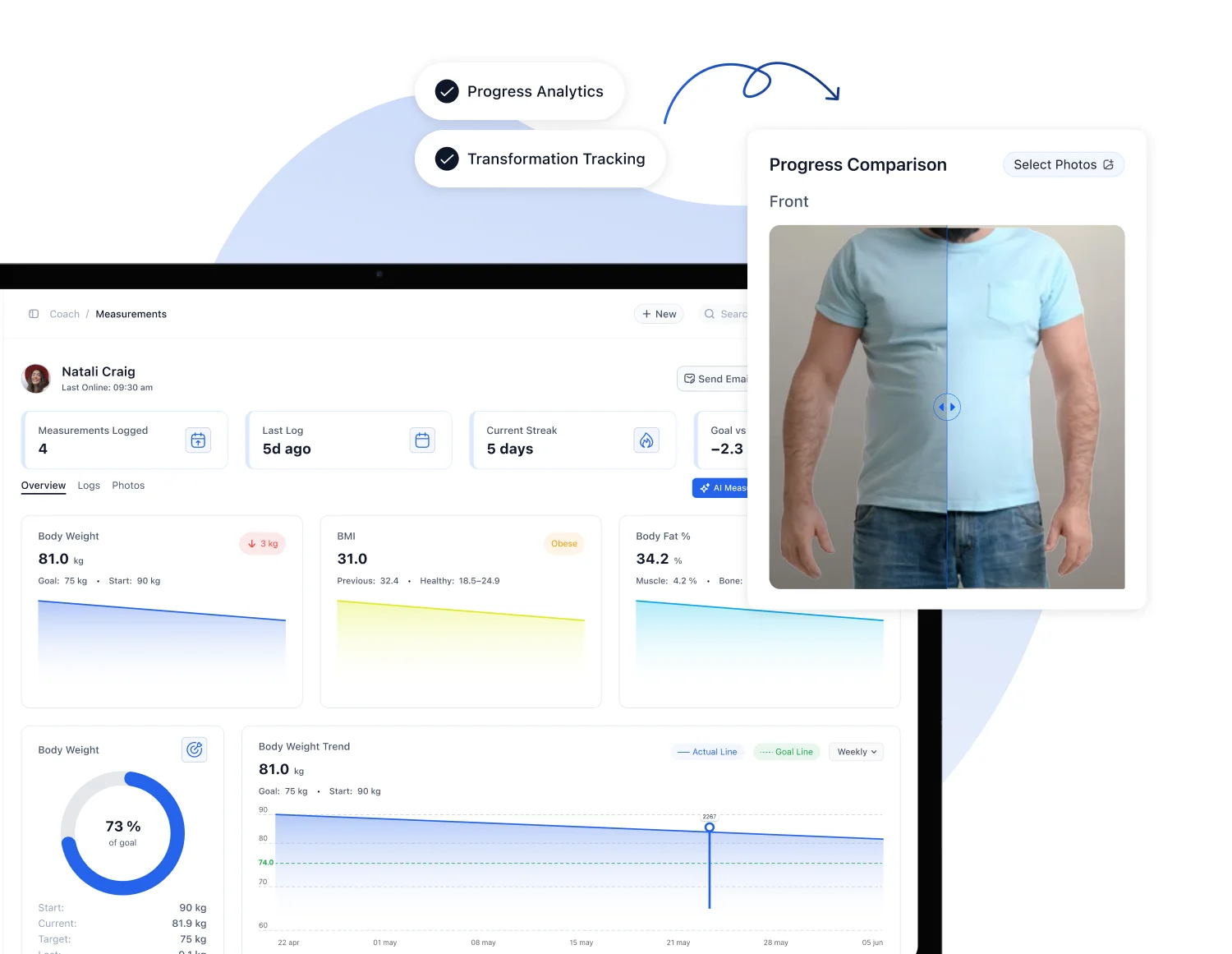
Progress photos only help when two images can be compared. That requires one written protocol: same spot, same light, same poses, same schedule, plus written consent and a clear rule for who sees the files. This guide gives coaches the protocol, a client instruction sheet, a consent template and a storage checklist. Nothing here is legal advice; consent wording should be reviewed by an attorney in your state.
TL;DR
- Set one protocol: same location, camera height, lens, lighting, clothing and three poses (front, side, back).
- Schedule photos on a fixed interval, usually every 4 weeks, with a baseline before the program starts.
- Get written consent before the first photo. Separate private review from any public use.
- Limit access, set a retention period, and define how a client withdraws consent.
- Keep photos beside measurements, training data and check-ins in one client record.
Why a written protocol matters
A progress photo is a data point. Like a body weight reading, it is only useful when conditions stay constant. Small changes in posture, camera angle, distance or light can look like changes in the body.
Typical problems when there is no protocol:
- Low camera angle makes legs look longer. High angle flattens shape.
- Mirror selfies shift with every arm and phone position.
- Different lighting hides or adds muscle definition.
- Different clothing changes how waist and hips read.
- Clients photograph on a day they feel good or bad and skip the rest.
A protocol removes the argument. The coach hands over the sheet once, and every later photo is judged against the same standard.
The photo protocol
Location and background
- Pick one spot in the home or gym. A plain wall works best.
- Use the same light source each time. Natural window light works if the time of day stays the same. Avoid mixed lighting and direct overhead glare.
- Keep the spot free of clutter so the body is the only thing that changes.
Camera setup
- Use a phone stand, tripod or a fixed shelf. Avoid handheld shots.
- Place the camera at about navel height, level, not tilted.
- Use the same lens each time. Stay on the standard 1x lens, not wide-angle, which distorts the edges of the frame.
- Mark the floor with tape for the camera position and the foot position. Mark the phone height once.
- Use the timer or a helper. A 10-second timer is enough for a front, side and back set.
Poses
Three relaxed poses, always in the same order:
- Front: arms relaxed at the sides, feet hip-width, facing the camera.
- Side: same stance, same arm position, same side to the camera every time.
- Back: same stance, head neutral.
Relaxed means no flexing, no sucking in, no posture correction. Posture differences alone can change how the waist, shoulders and glutes look. Flexed or “pump” shots can be added as an optional second set, labeled separately.
Clothing and condition
- Fitted clothing that shows the outline: shorts and a sports top or fitted shorts for men. Same garments each time.
- Hair tied back if it covers the neck or shoulders.
- Same time of day, ideally first thing in the morning before eating and drinking, so hydration and food volume stay constant.
- Same position in a menstrual cycle where the client and coach agree it is useful. This is a coaching note, not a requirement.
File handling
- Keep original files with date stamps. Do not filter or retouch.
- For side-by-side comparison, apply the same crop to both images and nothing else.
- Name files in one pattern: client, date, pose.
How often to take progress photos
There is no official rule. Practice among coaches falls into a pattern:
| Moment | Photo set | Purpose |
|---|---|---|
| Before the program | Baseline | Reference point |
| Every 4 weeks | Standard set | Visible trend |
| Every 2 weeks | Optional, shorter-term goals | Faster feedback for clients who want it |
| End of program | Final set | Summary of the full block |
Pick one interval and keep it. A steady 4-week rhythm gives cleaner comparisons than irregular sets. Compare each set with the baseline and the previous set, not with the last few days.
Photos beside other data
Photos are one of several measures. Review them with:
- Body measurements taken the same way each time.
- Training logs: weights, reps, sets.
- Check-in answers: energy, sleep, hunger, adherence.
- Habit logging and bodyweight trends.
A photo that looks “the same” while the squat increased 20 pounds and the waist measurement dropped tells a different story than a photo alone. Coaches see this in the full picture, not in a single image.
Clients who find photos hard
Some clients find photos stressful or discouraging. Registered dietitian Emily Field notes that photos can be emotionally triggering and suggests storing them out of routine view and using them with other progress markers rather than letting one number dominate, as described in her fat loss tracking post. Practical options for coaches:
- Make photos optional. Offer measurements and performance data instead.
- Let the client decide whether they see the comparison or only the coach does.
- Review photos in a scheduled check-in with context, not as a raw file drop.
- Pause photos at any time on the client’s request.
Client instruction sheet
Copy this into your onboarding materials.
Progress photo instructions
- Photo days: every 4 weeks, same weekday, first thing in the morning.
- Spot: same wall, same light, same floor marks.
- Camera: phone on a stand at navel height, 1x lens, timer on.
- Clothes: the same fitted outfit each time.
- Poses: front, side, back, relaxed, in that order.
- Upload: send the original files, unedited, by the date in your check-in.
- Privacy: photos go only to your coach. You can pause or stop at any time.
Client consent for progress photos
In the US there is no single federal rule for coaches who collect progress photos. State privacy laws differ, and some apply based on how many residents a business handles data for. A written consent form is good practice everywhere, and it matters most where a state defines consent strictly.
What the law looks like
New Jersey’s 2024 privacy law defines consent as a freely given, specific, informed and unambiguous affirmative agreement, and excludes broad terms that mix in unrelated information. It applies to businesses that operate in or target New Jersey residents and meet processing thresholds, and it took effect on January 15, 2025. Not every small coaching business meets those thresholds, but the definition is a useful design standard.
Washington’s My Health My Data Act goes further on health information. Its stated aims include extra disclosures, consumer consent and a right to have health data deleted. The statute also says an authorization to sell health data must be separate from the consent to collect or share it. Whether photos count as health data in a given case is a question for an attorney.

The practical takeaway: treat photos as sensitive. Collect consent in a separate, plain document, never bury it in general terms and conditions.
Consent form checklist
A consent form for progress photos covers:
- What is collected: photos (front, side, back), plus any measurements attached.
- Why: coaching review and progress tracking.
- Who sees them: the coach, named staff members by role, nobody else.
- Where they are stored: the platform or system used.
- How long: the retention period, for example until 12 months after the program ends.
- Edits: none other than a matching crop.
- Public use: a separate yes or no for each place a photo might appear, such as a website, social media or a case study. Say whether the face is visible, whether a name is used and whether there is any payment or discount.
- Withdrawal: how to withdraw consent (an email or message is enough) and what happens to the files afterward. Withdrawing should be as easy as giving consent.
- Minors: where a client is under 18, a parent or guardian signs. Check state rules with an attorney before collecting photos of minors at all.
- Date and signature.
Consent template
Adapt this wording and have your attorney review it.
Progress photo consent
I, [client name], agree that [coach/business name] may collect front, side and back progress photos of me on the schedule agreed with my coach.
Purpose: to review my progress and adjust my plan. Access: only my coach and [named roles]. Storage and retention: photos are kept in [system] for [period] after my program ends, then deleted. Edits: none, except a matching crop for side-by-side review. Public use: I agree / do not agree to use of my photos on [website] ☐ [social media] ☐ [case studies] ☐. Separate from this consent, I may be asked in writing for any public use. Withdrawal: I can withdraw consent at any time by messaging my coach. My photos will then be deleted within [period].
Signature / date
Keep public use separate from private coaching use. A client can agree to the first and decline the second with no effect on the coaching.
Protecting photos: storage and access
A consent form promises things. The system has to deliver them.
Storage checklist
- Store photos in the client record, not in a personal phone gallery or a shared chat group.
- Give access by role. A front desk person at a studio does not need photo access.
- Use strong passwords and two-step sign-in on every account with access.
- Avoid sending photos by email or texting them between staff.
- Set a retention rule and write it in the consent form.
- Delete on request and when the retention period ends. Delete exports, downloads and phone copies too.
- Record what was deleted and when.
- Stop using any photo the moment consent for it is withdrawn.
For teams and multi-location operators
- Name who may view photos: the assigned coach, a named supervisor, nobody else.
- Train every new coach on the protocol and the consent form during onboarding.
- Use the same protocol across locations, so comparisons stay valid when a client changes coach or site.
- Keep a short log of access rules and review it when staff changes.
Keeping photos with the rest of the client record
Photos are easier to use when they sit next to the rest of the coaching data. FITsociety’s help center explains how coaches view and interpret a member’s progress, and how workouts and weights are recorded in logging workouts and weights. Those records are what the photo comparison gets read against.
A simple review routine:
- Client sends the photo set and check-in on the agreed date.
- Coach opens the baseline, the previous set and the new set in the same order.
- Coach checks measurements and training logs for the same period.
- Coach writes a short note: what changed, what did not, what to adjust.
- Coach sends the note through the client chat, not the raw comparison images alone.
Where FITsociety fits
FITsociety is community-driven fitness software for personal trainers, online coaches, studios and gyms, developed with feedback from fitness professionals. It brings client administration, intake forms and check-ups, training and nutrition plans, progress tracking, bookings, communication, memberships and payments into one dashboard, with a client portal and mobile apps for clients. Coaches keep the protocol, the consent routine and the review notes alongside the plans and progress data they already manage. FITsociety provides the software. Coaches deliver the coaching and make the decisions.

Plans, as published on fitsociety.io: Coach at €179 per month, Team at €289 per month and Club at €489 per month.
Common mistakes
| Mistake | Fix |
|---|---|
| Mirror selfies | Stand, timer, fixed phone position |
| Changing lens or zoom | Lock to the 1x lens |
| Random timing | Fixed interval and weekday |
| Filtered or edited images | Original files, matching crop only |
| Consent buried in terms | Separate, signed consent form |
| Photos in personal chat apps | One client record with role-based access |
| No retention rule | Written period and deletion step |
| Photos used publicly without asking | Separate written yes or no per place |
FAQ
How do I take progress photos by myself?
Put the phone on a stand at about navel height, use the 1x lens and set a timer. Mark the phone and foot positions on the floor, then shoot front, side and back in the same order. Use the same light and clothing each time.
How often should clients take progress photos?
Every 4 weeks is a common interval, with a baseline before the program starts and a final set at the end. Some coaches use 2 weeks for shorter goals. Whichever interval you choose, keep it constant.
Do I need written consent for progress photos?
Yes, written consent is the safe standard before the first photo. It should name who sees the photos, where they are stored, how long they are kept, and whether any public use is allowed. State laws differ, so have an attorney review your form.
Can I post a client’s progress photos on social media?
Only with separate written permission for that specific use. Name each place the photo may appear, say whether the face and name show, and state any payment or discount. The client can withdraw permission later, and the coach then stops using the photo.
What should I do when a client withdraws consent?
Stop using the photos at once and delete them from the client record, exports and phone copies within the period promised in the form. Confirm the deletion to the client in writing. Keep a short note of the date and what was removed.
Sources
- New Year, New Privacy Law in New Jersey (Mintz)
- Chapter 19.373 RCW, Washington My Health My Data Act
- How to Know Your Macros Are Working: Fat Loss Edition (Emily Field, RD)