

A personal trainer intake form is the short digital questionnaire you send immediately after a client signs up, covering PAR-Q screening, medical history, goals, logistics, and a signed waiver. Send it within two hours of signup. Once it’s back, review it before session one for red flags, medications, and injury history so your first workout is built around real information, not guesswork.
TL;DR:
- Sending the intake form within two hours of signup and bundling it with the waiver increases completion rates and secures client commitment early.
- The intake questionnaire should include contact details, PAR-Q health screening, medical and injury history, goals, preferences, logistics, and an e-signature for legal backing.
- A well-designed digital form with conditional logic and minimal required fields can be completed in under six minutes, boosting client compliance.
- Intake answers influence training programming from day one, especially medication and injury details, and help set measurable 30-day goals.
- Integrating the intake process into a single platform reduces administrative errors, saves time, and enhances data accuracy for ongoing client management.
Personal Training Intake Form vs. Consultation and Waiver: What Goes Where
Trainers often blend three separate documents into one confusing packet. A consultation form is the conversation starter, usually a short set of questions used during a discovery call to see if you’re a good fit. The intake form comes after the sale closes. It’s the detailed data collection tool covering health, goals, and logistics. The waiver is a legal document, sometimes bundled with intake but functionally distinct: it releases liability rather than gathering information.
The sequence matters. Send the intake form within two hours of signing, and bundle it with the waiver, service agreement, and billing link rather than sending four separate emails. That single-message approach converts more paperwork completions than a drip sequence, and it locks in commitment while enthusiasm is still high.
What Fields Belong on Every Personal Trainer Intake Questionnaire?
A complete intake questionnaire groups naturally into seven clusters. Miss one, and you’re either exposing yourself legally or programming blind.
- Contact and emergency contact: Name, phone, email, and a designated emergency contact with relationship and number. Address matters more than trainers assume. It tells you commute time to your facility and can matter for insurance documentation if an incident occurs on-site.
- PAR-Q or readiness screening: A standardized health-history questionnaire, not a casual “any injuries?” question. This is the piece NASM identifies as central to protecting trainers from liability while giving you the context to build a safe plan.
- Medical history and medications: Chronic conditions, current medications, and anything affecting heart rate response, balance, or recovery.
- Injury history: Dates of injury, not just the injury name. A shoulder impingement from 2019 behaves differently than one from three months ago.
- Goals with a “why now” prompt: A measurable target plus the motivation behind the timing.
- Training history, preferences, and logistics: Past programs, preferred session format, and realistic weekly availability.
- Consent and e-signature: Legally binding acknowledgment with a timestamp.
- Optional fields: Sleep, nutrition snapshot, and stress level. Useful for coaches who program lifestyle alongside exercise, but skip them if they push completion time past your target.
PAR-Q Screening: The Questions That Actually Protect You
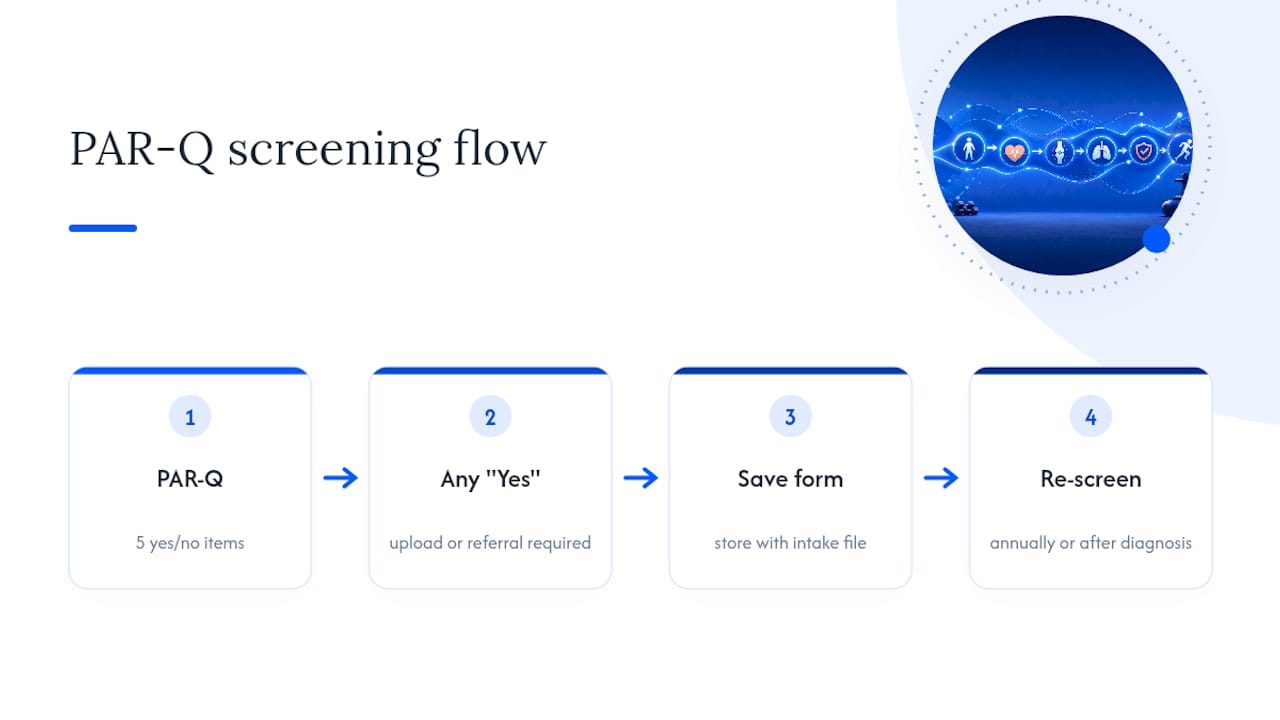
PAR-Q stands for Physical Activity Readiness Questionnaire, an industry-standard screening tool used to flag clients who need physician clearance before starting exercise. It’s not optional paperwork. It’s the mechanism that keeps you within your scope of practice as a trainer rather than a diagnostician.
Typical yes/no items include: chest pain during activity, dizziness or loss of balance, bone or joint problems worsened by exercise, current blood pressure medication, and physician advice against exercise. The Exercise is Medicine health-history questionnaire is a solid reference template if you’re building your own version.
Any single “yes” should trigger a hard rule: require a physician clearance upload or referral before the first session. Don’t interpret the medical detail yourself. Your job is to collect and route, not diagnose. Store completed PAR-Qs with the rest of the intake file, and re-screen annually or immediately after a client reports a new diagnosis.
When to Send the Intake Form and What to Check Before Session One
Timing is where most trainers lose momentum. Here’s the sequence that works:
- Within two hours of signup, send intake, waiver, service agreement, and billing link together as one bundle.
- Review submissions as they arrive: scan for PAR-Q flags, note medications and injuries, and sketch a rough assessment plan.
- At the first session, run in-person movement screens and baseline conditioning, using intake answers to skip redundant questions and focus on what actually needs eyes on it.
- Follow up on a fixed cadence: a 24-hour check-in, a week-one systems check, and a 30-day reassessment tied to the goals stated on intake.
Building a Fast Digital Intake Form: Field Order and Conditional Logic
Field order affects completion rate as much as field count. A mobile-first sequence that works: Contact → PAR-Q → health and injury history → goals → logistics → consent and signature. Front-loading contact info gets clients invested before they hit the harder health questions.
Conditional logic keeps the form short for easy cases and thorough for complicated ones.
- A “yes” on any PAR-Q item triggers a required physician clearance upload field.
- A “yes” on pregnancy triggers additional questions about trimester and physician approval for exercise.
- A “yes” on prior injury opens a follow-up field for date and current limitation status.
Templates built this way, with PAR-Q and e-signature fields included, typically complete in under six minutes. That speed matters because completion rate drops fast once a form feels like homework.
Pro Tip: Route form submissions straight into client records through CSV export or a webhook connection instead of copying answers by hand. It removes a transcription step where injury details and medication notes are most likely to get lost.
Best Practices for Digital Intake Forms: UX, Privacy, and Integrations
A few adjustments separate a form clients actually finish from one they abandon halfway through.
- Keep required fields to the minimum needed for safety and programming. Everything else can be optional.
- Use a typed or drawn e-signature with an automatic timestamp, giving you a documented paper trail if a liability question ever comes up.
- Collect only the personal data you need, and say so plainly on the form. Clients respond better to intake requests when the privacy language is short and specific rather than buried in legal boilerplate.
- Export to CSV or connect the form to a webhook or Zapier flow so answers populate the client’s profile automatically.
- Re-screen PAR-Q items annually, and rebuild forms with accessibility in mind (readable font sizes, clear labels, no tiny tap targets on mobile).
Turning Intake Answers Into the First Session and a 30-Day Plan
Medications and injuries on the intake form become programming constraints on day one. Blood pressure medication might mean closer monitoring during high-intensity intervals. A prior knee injury restricts certain loading patterns until you’ve assessed range of motion in person.
The “why now” answer matters more than it looks. Framing a goal in the client’s own words predicts adherence better than a checklist of preferred exercises, so use it to set coaching cues, not just to fill in a field. Build your first-session movement screen and baseline conditioning test around what intake already told you, then set one or two measurable 30-day outcomes and put the reassessment on the calendar before the client leaves session one.
Why an Integrated Intake Workflow Beats Scattered Paperwork
Trainers running intake through a form tool, waivers through a separate e-signature app, and billing through a third platform lose time stitching data together. Every gap between systems is a place where an injury note or a medication detail gets missed.
FITsociety consolidates client intake, training and nutrition plan delivery, scheduling, and payment processing into one workflow, so an intake submission can feed directly into the client’s profile and programming without a manual copy step. Coaches managing intake this way report spending less time on repetitive admin and more time actually reviewing what a new client told them, which matters most in the first week when adherence habits get set.
What Trainers Get Wrong About Intake Forms
Most advice on intake forms treats them as a compliance checkbox, something to send once and file away. That misses the point. The form’s real value is in the reassessment cycle it sets up, not the single document itself.
The two-hour send window gets treated as a nice-to-have. It isn’t. Momentum decays fast after signup, and a client who sits three days without a form is a client whose enthusiasm has already started cooling. Bundling intake with the waiver and billing link isn’t just convenient. It’s the difference between one commitment moment and four separate chances for a client to lose interest.
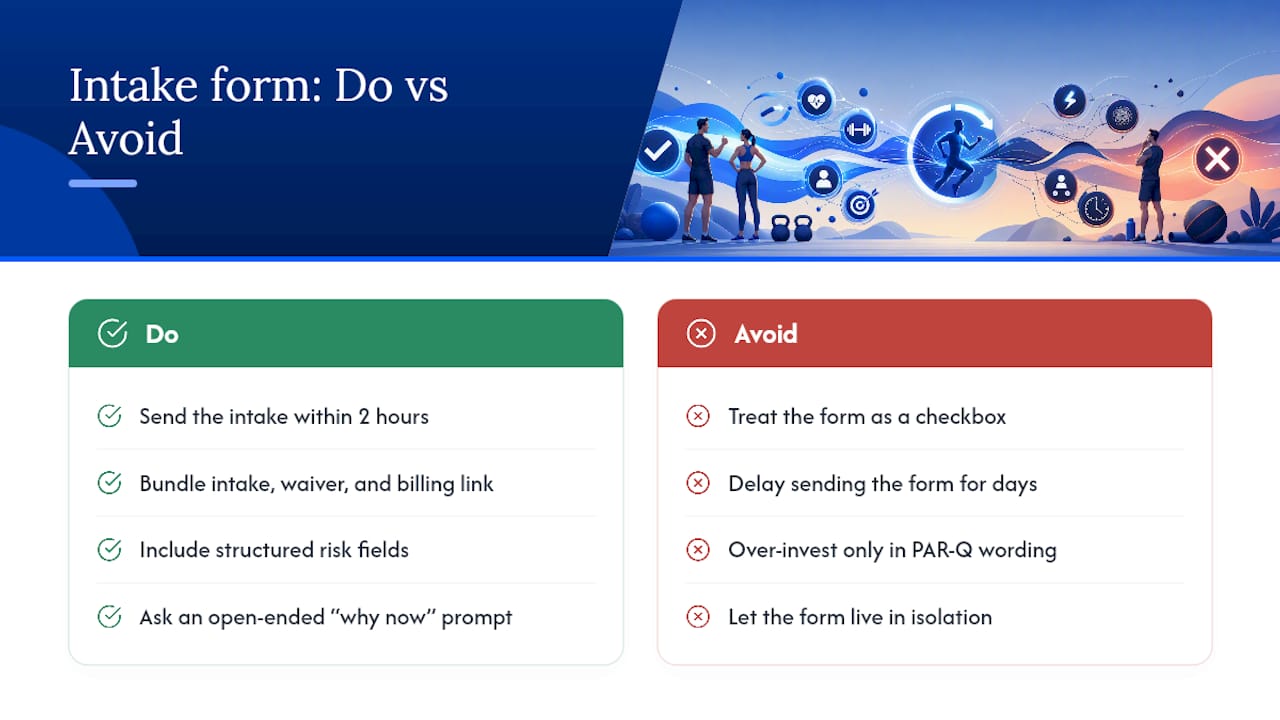
The other blind spot: trainers over-invest in PAR-Q wording and under-invest in the “why now” question. A clean liability screen protects you legally, but it tells you nothing about whether this client will still be showing up in week six. Structured fields catch risk. Open-ended prompts catch motivation. You need both, and most templates online only give you the first.
If there’s one place to spend extra effort, it’s connecting the form to whatever system runs your programming and billing. A form that lives in isolation from your client records is a form you’ll stop trusting within a month.
— Matthijs
Manage Intake, Programming, and Billing Without Switching Tools
Some software platforms replace the patchwork of a form builder, a separate e-signature app, and a standalone billing tool with one system where intake answers feed directly into a client’s training profile.

That means a PAR-Q flag or an injury note from intake shows up right where you’re building the client’s program, instead of sitting in a form inbox you have to remember to check. Billing, scheduling, and nutrition plans run through the same platform, so a new signup moves from intake to first session without you re-entering the same information three times. If you’re currently stitching together a form tool, a payment processor, and a spreadsheet, that gap is exactly what this closes. Visit the FITsociety coaching platform to see how intake connects to programming, or start a trial to run your next client signup through it directly.
Sources
- How to conduct fitness consultations | NASM
- Personal Training Client Intake Form (+ Free Template) | TrainerBlueprint
- EIM health history questionnaire (Exercise is Medicine)
- 12 must-ask questions for new personal training clients | ISSA
Made with BabyLoveGrowth’s SEO writer



