

AI inside an all-in-one coaching platform automates the admin work that eats a trainer’s week: program variations, check-ins, scheduling, and lead follow-up. Coaches using integrated AI features report reclaiming 45 to 90 minutes per client per week and hours of written communication overall. Platforms like FITsociety build these tools directly into the coaching workflow, not as a bolt-on app.
TL;DR:
- Automating scheduling and check-ins with AI can save trainers up to 90 minutes per client weekly and improve client retention through consistent engagement.
- AI tools amplify current programs by generating variations based on specific constraints, enabling trainers to retain control over program design.
- Implementing AI requires connecting relevant client data, establishing human review for high-risk outputs, and starting with narrow workflows to ensure safety and effectiveness.
- Cost-effective AI solutions for small studios range from around $65 to $900 monthly, with the fastest ROI coming from lead capture and recovering at-risk clients.
- Clear communication about AI use and maintaining human oversight build client trust, while training staff on distinct AI tasks prevents fears of job replacement.
High-Impact AI Use Cases Inside a Coaching Platform
AI earns its place in a trainer’s stack when it removes repetitive work without removing the trainer’s judgment. That distinction shapes every use case below.
Program variations. AI doesn’t design a client’s program from nothing. It amplifies a plan a trainer already built. Feed it a client’s current microcycle and a specific constraint (a shoulder issue, a travel week with no equipment), and it produces graduated variations for the trainer to review and adjust. The trainer stays the author. The AI just cuts the drafting time.
Automated onboarding and check-ins. New-client intake forms, goal-setting questionnaires, and weekly check-in prompts can run on autopilot, then flag anything that needs a human response. This is where retention actually lives: clients who get consistent, timely check-ins stay longer than clients who wait three days for a reply.
Smart booking and lead capture. A missed call or a slow-to-answer inquiry is a lost sale. An AI receptionist inside the platform can answer scheduling questions and capture leads at 11 p.m. on a Sunday, when no studio owner is picking up the phone.
Churn prediction and triggered outreach. Behavioral signals, attendance, bookings, and session notes predict churn far better than demographics alone, and models built on that behavioral data reach their strongest performance when attendance and engagement are combined. When a client’s attendance drops, the system flags it and drafts an outreach message before the client quietly disappears, improving retention.
Content generation. Social captions, a monthly newsletter, a recipe blast, these take real time to write from scratch every week. AI drafts them; a human edits and approves.
Analytics-driven prompts. Progress data sitting in a dashboard is useless until someone acts on it. AI can turn a plateau in a client’s weight log into a suggested program tweak, rather than a number nobody looks at until the next check-in.
Weekly and Daily AI Workflows Trainers Can Copy
The trainers getting real value from AI aren’t running it constantly. They’ve built a small number of repeatable routines and stuck to them.
A weekly rhythm that works:
- Sunday planning block. Generate the week’s program variations for clients with flagged constraints, and draft the month’s content calendar in one sitting.
- Daily review window. Set aside 2 to 5 minutes each morning to review AI-drafted check-ins and reminders before they go out. Edit, don’t rewrite from scratch.
- Trigger-based outreach. When a client misses a session, the system flags it automatically, drafts a message, and routes it to the trainer for a quick approval before sending.
- Weekly retro. Scan which AI drafts needed heavy editing versus a light touch. That tells you where the prompts need better inputs.
The single biggest failure point is a vague prompt. Feeding the AI a client’s actual 4-week program plus a specific constraint produces usable output; asking it to “make a workout plan” invites a generic, sometimes unsafe, response.
Pro Tip: Don’t try to automate everything at once. Pick one trigger (missed sessions) and one channel (SMS or WhatsApp) for your first month. Expanding a workflow that already works is far easier than fixing five broken ones at once.
Rollout advice from practitioners is consistent on this point: start narrow, prove the workflow, then expand one trigger and one channel at a time.
Implementation Checklist: Data, Oversight, and Legal Limits
Rolling out AI without a plan is how trainers end up with a chatbot that gives out contraindicated advice. A short checklist prevents most of the damage before it happens.
Before you turn anything on:
- Connect intake forms, attendance records, session notes, and payment data so the AI has real inputs to work from, not guesses.
- Decide up front which outputs always require a human sign-off. Nutrition prescriptions and anything touching an injury sit in that category, always.
- Send clients a short notice explaining that AI assists with scheduling and check-ins, and give them a clear path to reach a human directly.
- Run a 30 to 90 day pilot with a small group, tracking response rate, trial-to-paid conversion, and churn.
- Require a manual review step for any message the AI itself flags as high risk.
A hard legal line to know: in many regions, prescribing individualized meal plans is regulated health practice. A trainer without a dietitian credential can face real liability if AI generates a meal plan and it goes out under their name, regardless of who wrote it.
AI also hallucinates. It produces confident, plausible, and sometimes wrong answers, which is why human review before anything ships matters more here than in almost any other software category a trainer will adopt. For anything beyond general fitness guidance, medical and nutrition questions belong with a licensed professional, not an AI output.
What Should You Pay, and What Pays Back Fastest?
Cost tiers vary by how much of the business AI is expected to run. Starter tools run roughly $65 to $500 a month, suited to a solo trainer automating check-ins and basic scheduling. Mid-tier platforms, in the $400 to $900 a month range, add lead capture, churn prediction, and richer analytics for a small studio. Custom builds starting around $8,000 in setup costs make sense only for larger operations with unique workflows.
The fastest payback usually comes from the least glamorous features: capturing a lead that would have gone to voicemail, and recovering a client who was about to quietly cancel. If a missed call costs a studio a typical monthly membership fee, and the AI receptionist captures even a handful of those a month, the platform pays for itself before the trial period ends.
A rough way to size it: multiply the hours saved per week by your billable hourly rate. Reclaiming 5 hours a week at a $60 hourly rate is $300 a week back, whether that goes into more client sessions or just a shorter workday.
Deployment timelines matter too. A single function, like automated check-ins, typically goes live in 1 to 2 weeks; a full-stack rollout covering scheduling, payments, and analytics together takes 4 to 6 weeks.
Before choosing a platform, check:
- Does it integrate with your existing payment processor and calendar?
- Do you retain ownership of client data if you switch platforms later?
- What does support look like after the trial period ends?
- Can the AI features be customized to your training style, or are they one-size-fits-all?
Keeping Client Trust When AI Enters the Conversation
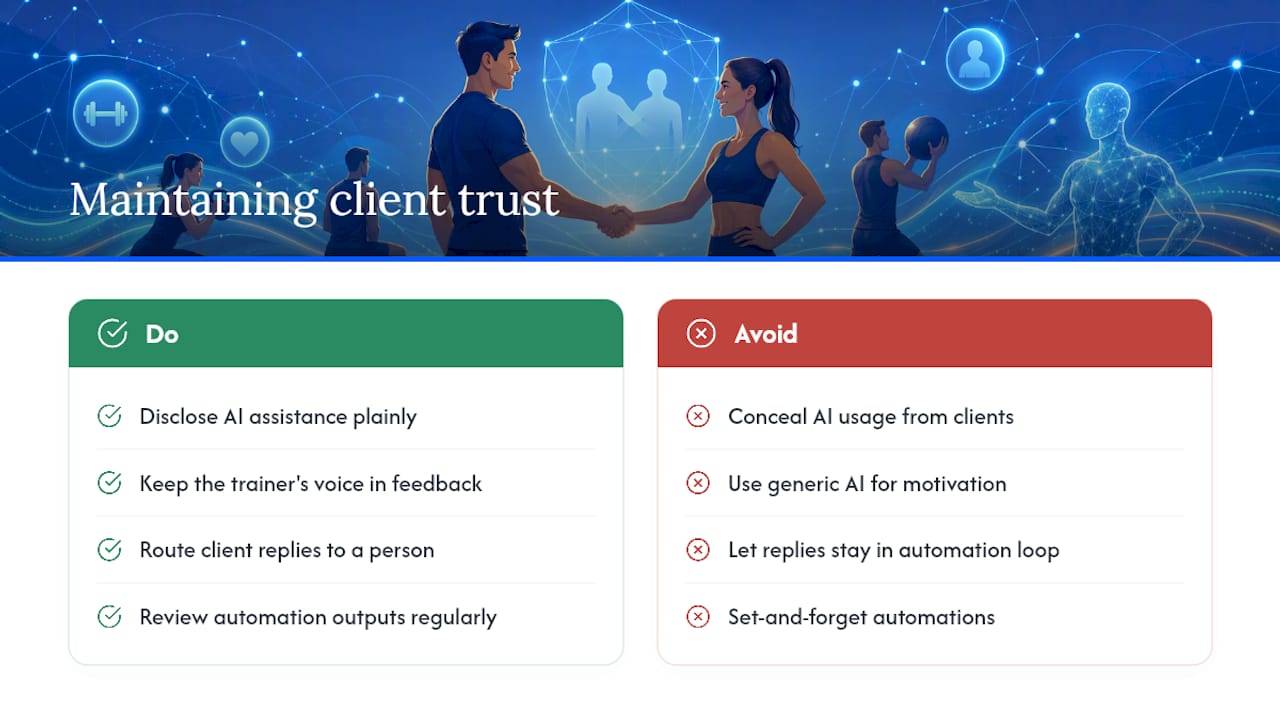
Clients don’t object to AI helping behind the scenes. They object to feeling like they’re talking to a machine when they thought they were talking to their coach.
The fix is disclosure, not concealment. Tell clients plainly that check-in reminders and scheduling messages are AI-assisted, and that their trainer reviews anything substantive before it reaches them. Most clients respond better to honesty about the tool than to discovering it later and wondering what else was automated.
Keep the trainer’s voice in anything that touches motivation, feedback, or correction. A generic AI-drafted congratulations on a personal record lands flat next to a two-line note that references something specific from last week’s session. Save the AI for logistics; save the personal touches for the human.
Set a clear escalation path from day one. If a client replies to an automated message with a real question or a concern, that response routes straight to a person, not back into the automation loop. Nothing erodes trust faster than a client realizing their concern went to a bot that couldn’t actually help.
Finally, review outputs regularly, not just at launch. A phrasing that felt fine in month one can read as tone-deaf by month four if a client’s situation changes and the automation doesn’t catch it.
Getting Your Team Comfortable With AI Tools
Most resistance to AI adoption inside a training business isn’t about the technology. It’s about trainers worrying the tool will replace part of their job, or that they’ll look foolish sending a client something the AI got wrong.
Address that directly instead of hoping it resolves itself. Walk the team through exactly which tasks the AI handles (drafting, scheduling, flagging) and which stay entirely human (programming decisions, feedback, anything medical). That line needs to be explicit, not assumed.
Most all-in-one platforms build in onboarding resources: guided setup walkthroughs, template libraries for common prompts, and support channels for when a workflow breaks. Lean on those instead of building prompts from scratch through trial and error.
Start training with the lowest-stakes workflow in the business, usually appointment reminders or a content calendar, before touching anything client-facing that involves programming or nutrition. Confidence builds fastest when the first automation clearly works and nobody’s client got a bad experience out of it.
Revisit the setup every quarter. AI features inside coaching platforms update often, and a workflow built six months ago may now have a better, faster version available that nobody on the team has tried yet.
Author Perspective: AI as a Teammate, Not a Replacement
The trainers getting real value from AI aren’t the ones chasing every new feature. They’re the ones who picked one annoying task, automated it, watched it closely for a month, and only then moved to the next one.
The lesson that keeps surfacing across practitioner data is unglamorous: start small, keep a human reviewing anything that touches health or safety, and measure the pilot before scaling it. Skip any of those three and the tool becomes a liability instead of a time saver.
For a deeper look at rollout planning, the implementation checklist and case studies on the FITsociety blog cover what this looks like in practice for studios of different sizes.
— Matthijs
Try FITsociety’s AI Features for Your Coaching Business
An all-in-one coaching platform maps directly onto the workflows this guide describes. Program variation drafts, automated check-ins, scheduling, payments, and client analytics all live inside one dashboard, so there’s no separate chatbot tool bolted onto a separate booking tool bolted onto a separate payment processor.
That consolidation is a real advantage over cobbling together multiple point solutions: one login, one data source feeding the AI, and unified support for when something needs fixing. The coaching feature set covers training and nutrition workflows without overstepping into territory that requires a dietitian credential, keeping the legal lines from the checklist above intact by design.
If your business is still running check-ins through a spreadsheet and scheduling through a separate app, that’s usually the first sign you’re leaving time on the table. Start a trial and see which AI-assisted workflow pays back fastest for your client list, whether that’s automated check-ins, missed-session recovery, or booking capture outside business hours.
Sources
- AI Tools for Personal Trainers in 2026: What Actually Works
- How AI Is Transforming Studio Operations in 2026 — Nutripy
- AI for Fitness & Wellness: How Gyms, Trainers, and Studios Automate in 2026 | SuperDupr



